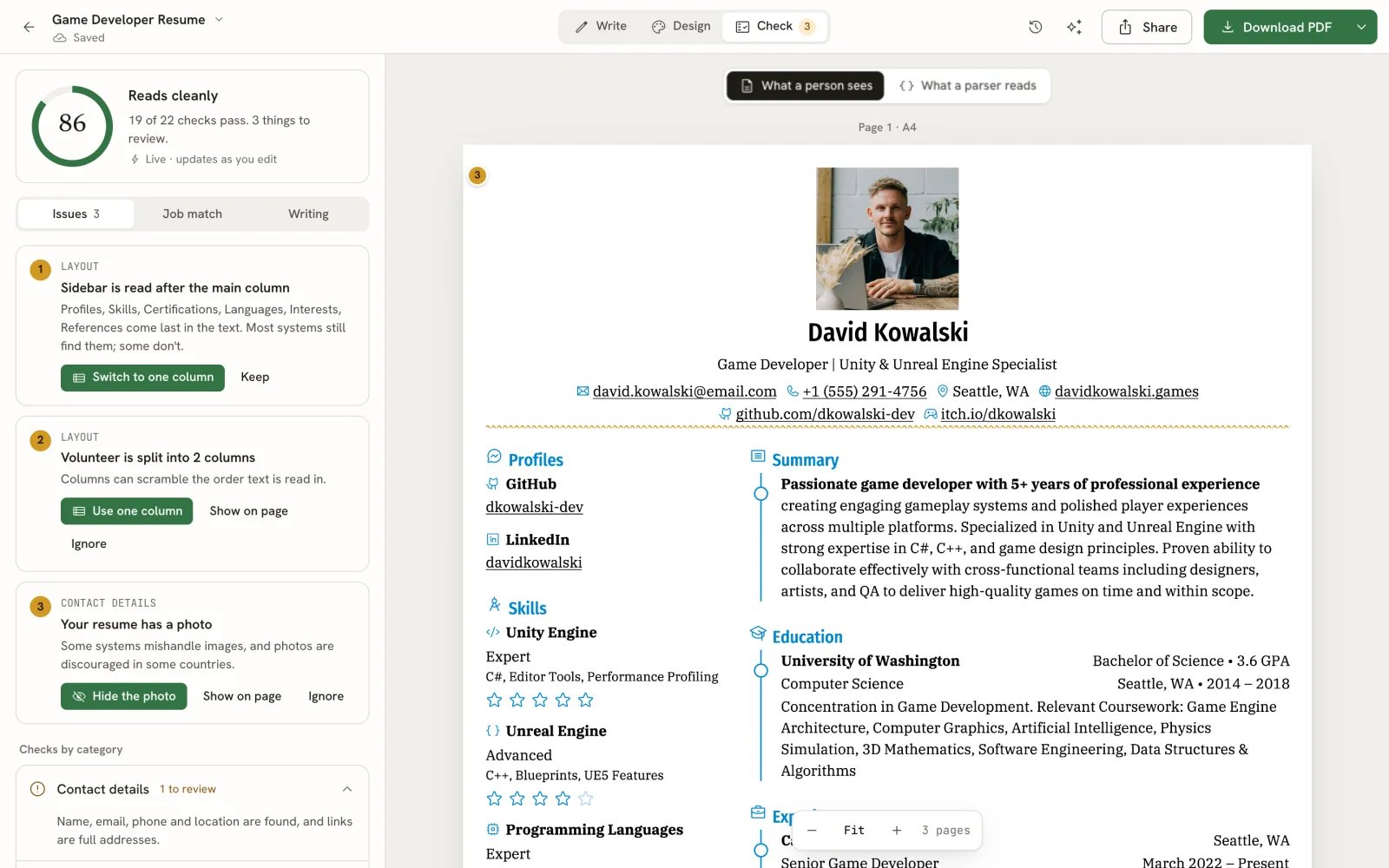
Use Check mode to see how well software reads your resume, fix issues pinned to their lines, match a job posting and review your wording.
Before you send a resume, open Check in the editor. It shows how reliably an applicant tracking system (ATS) can read your resume, pins each problem to the line it’s about, and compares your resume with a job posting. Everything except the optional writing review runs in your browser.
Check mode: the score and issues on the left, numbered pins on the page
Open Check
In the editor bar, select Check, or press 3 when you aren’t typing in a field. The tab shows how many issues are open, or a check mark when there are none.Check updates as you edit. Switch to Write, change something, and the score and issues follow straight away.
Read the score
The panel starts with a score from 0 to 100 and a short verdict: Reads cleanly (80 and above), Mostly readable (50 to 79) or Hard for software to read (below 50).
The score, what it counts, and the first issue card
The score is the share of checks your resume passes, for example 19 of 22 checks pass. There are 22 checks, grouped into five categories:
Category
What it looks at
Contact details
Your name, email, phone and location are there, email and links are in a form software recognises, and whether a photo is showing.
Dates
Every experience and education entry has dates, in a form software reads, that don’t run backwards or start in the future.
Layout
Every section with entries is placed on a page, text reads in order (sidebars, multi-column sections), and body text size, line height and page margins aren’t too small.
Section headings
Headings are ones software looks for, such as Experience, Education and Skills, and some work history shows.
Writing
Every role describes what you did.
The heading check only runs when your resume’s language is English, so resumes in other languages have 21 checks.
The score measures how reliably software can read your resume. It doesn’t predict whether you’ll be shortlisted.
Below the issues, Checks by category lists each category with how many checks pass, or how many need a look. Select a row to read what it covers.
Checks by category, with the exported PDF check below
Fix issues
The Issues tab lists every open issue as a numbered card, most serious first. Each card names its category, says what’s wrong in plain words, and offers a fix.
1
Find the issue on the page
Each issue about a specific part of your resume has a matching numbered pin in the page margin, with a wavy underline under that part. Select a card, or its Show on page button, to outline the line on the page and scroll to it. Select a pin on the page to jump to its card.
Issue 2 selected: its pin and outline on the page
2
Apply the fix
Many issues fix in one step. The card’s main button says what it does, for example Hide the photo, Use one column, Switch to one column or Use the standard heading. A message confirms the change and offers Undo.Other issues need you to write something, such as a missing phone number or a role with no description. Their button, for example Add a phone number or Describe the role, switches to Write and opens the right field.
3
Or set the issue aside
If an issue doesn’t apply to you, select Ignore. For a choice that is yours to make, such as a two-column design, the button reads Keep instead. Ignored issues no longer count against the score. To bring them back, select Show them again under the list.
When every check passes, the tab reads Nothing to fix.
On a phone, selecting a pin opens a bar at the top of the page that reads “Issue 1 of 3”. Use the arrows to step
through the issues and fix each one from the card at the bottom, without leaving the page.
See what a parser reads
At the top of the page, switch from What a person sees to What a parser reads. The page is replaced by the text software pulls out of your resume’s PDF, in the order it comes out, with the name, email, phone, location, links, section headings and dates it recognised.
What a parser reads. On this two-column resume, the location was picked up from the wrong line
Use it to spot content that lands in the wrong place, for example a sidebar read after your experience, or a field picked up from the wrong line. Switch back with What a person sees.
Match your resume to a job
The Job match tab picks out the terms a job posting stresses and shows which ones your resume already has. It isn’t part of the score.
1
Give it a posting
If the resume is linked to an application that has a saved posting, Job match uses that posting. If the linked application has no posting yet, paste it into the box and select Save to the application. Otherwise, choose an application from the list, or paste the posting into the box and select Match this posting.A pasted posting is kept for this visit only. To keep it, select Save as application…, enter the Company and Role, and select Save and link. This creates an application and links the resume to it.
2
Review the terms
The tab shows how many posting terms appear, for example 19 of 25 posting terms appear. Terms under Not in your resume · add only if true are missing. Terms under Already covered are there already: select one to highlight where it appears on the page.
3
Add a missing term, if it's true
Select a missing term to see how often the posting uses it, then choose:
Add to Skills to add it as a keyword on your first visible skill, which the button names (for example Add to Skills · Unity Engine). If you have no skills, it creates one.
Ask the assistant to work it in to open the Assistant, which asks you before it adds anything.
Not true for me, hide it to leave it out of the match. Hidden terms are listed under the tab with Show again.
Job match with a pasted posting and a missing term selected
Once a resume is linked, the top of the tab names the application. Select Change to link a different application or to unlink it.
Check the exported PDF
The checks above read your resume’s content and settings. To test the actual file a recruiter receives, select Also check the exported PDF at the bottom of the Issues tab. Reactive Resume creates the PDF in your browser and runs the full file check on it, the same one the ATS checker uses. Nothing is uploaded.A message tells you whether the PDF reads cleanly or how many more things there are to look at. Anything it finds is pinned to the page with a PDF icon and a dashed outline.
A pin from the exported PDF check
Select Show in the message, or any PDF pin, to open the full report. It gives a score out of 100, a score for each category (Readability, Layout, Sections, Contact details, Dates), and each finding with what to do about it. Writing holds tips that don’t affect the score.
The exported PDF report
The pins show while the Issues tab is open, until you change the resume. After an edit, run the check again.
Get a second opinion on your wording
The checks are mechanical. The Writing tab asks an AI model how a reader might react to your summary and bullets, and suggests rewrites. It needs your own AI provider; see Connecting an AI provider. Without one, the tab offers Open AI settings. Issues and Job match work without AI.
1
Choose the model
The tab says where your resume’s text goes, for example “Sends your resume’s text only to OpenAI · gpt-5-mini, with your key.” To use another of your providers, select Change and pick it.
2
Run the review
Select Review writing. The review reads up to 120 bullets and paragraphs.
3
Accept or reject the suggestions
Rewrites of your own bullets appear as Proposed edits, numbered in the page margin. Select Accept or Reject on each, or Accept all. With an edit focused, A accepts it, R rejects it, and ↑↓ move between edits.Advice that isn’t a rewrite appears as a note marked High, Medium or Low, with Show on page. What’s working lists your strengths. Select Run again for a fresh review.
A model’s opinion can be wrong, and the review never changes the score. Accept only the rewrites that are true to your
experience.
Related guides
Using the ATS checker
Check any resume PDF, from any tool, without signing in.
Tailoring a resume for a job
Copy a resume for an application and adjust it to the posting.
Using the Assistant
Ask the AI assistant to rework parts of your resume.
Arranging the layout
Move sections between columns and pages.
Was this page helpful?
{"docsConfig":{"theme":"mint","$schema":"https://mintlify.com/docs.json","name":"Reactive Resume","description":"A privacy-minded resume builder that is customizable, portable, open-source, and free to use.","colors":{"primary":"#166534","light":"#07C983","dark":"#15803D"},"logo":{"light":"https://mintcdn.com/lazymedia/xQwnX2p0cH0ikg4N/logo/light.svg?fit=max\u0026auto=format\u0026n=xQwnX2p0cH0ikg4N\u0026q=85\u0026s=d1f33b2f1a2e267e216791b900b3be3d","dark":"https://mintcdn.com/lazymedia/xQwnX2p0cH0ikg4N/logo/dark.svg?fit=max\u0026auto=format\u0026n=xQwnX2p0cH0ikg4N\u0026q=85\u0026s=f8c939ac0fc1f02ebda5ae09a983fd55","href":"https://rxresu.me"},"favicon":"https://mintcdn.com/lazymedia/xQwnX2p0cH0ikg4N/favicon.svg?fit=max\u0026auto=format\u0026n=xQwnX2p0cH0ikg4N\u0026q=85\u0026s=b6a2cd8aaf8b312b59627ed7e32c84cd","background":{"decoration":"grid"},"navbar":{"links":[{"href":"https://github.com/reactive-resume/reactive-resume/issues","label":"Support"}],"primary":{"type":"button","label":"Get Started","href":"https://rxresu.me"}},"footer":{"socials":{"website":"https://rxresu.me","github":"https://github.com/reactive-resume/reactive-resume"}},"seo":{"metatags":{"canonical":"https://docs.rxresu.me","og:image":"https://rxresu.me/opengraph/banner.jpg"},"indexing":"navigable"},"fonts":{"heading":{"family":"IBM Plex Sans"},"body":{"family":"IBM Plex Sans"}},"icons":{"library":"lucide"},"contextual":{"options":["copy","view"],"display":"header"},"styling":{"latex":true},"navigation":{"global":{"anchors":[{"anchor":"Reactive Resume","icon":"link","href":"https://rxresu.me"},{"anchor":"Source Code","icon":"github","href":"https://github.com/reactive-resume/reactive-resume"}]},"pages":[]}},"deployment":{"deploymentMetadataValue":{"subdomain":"lazymedia","hasAudioNarration":false,"actualSubdomain":"lazymedia","customDomains":["docs.rxresume.org"],"gitSource":{"type":"github","owner":"pickit420","repo":"reactive-resume-v2","deployBranch":"main","contentDirectory":"docs","isPrivate":true,"mountPath":"","label":""},"feedback":{"thumbs":true},"entitlements":{},"buildId":"6acd5ecec0f93a41cf028e52","clientVersion":"0.0.4344","searchFilterCounts":[{"language":"default","tag":"API Reference","count":191},{"language":"default","tag":"Documentation","count":117},{"language":"default","tag":"Applications","count":35},{"language":"default","tag":"Career","count":30},{"language":"default","tag":"Resumes","count":26},{"language":"default","tag":"Documents","count":24},{"language":"default","tag":"Cover Letters","count":24},{"language":"default","tag":"Comparisons","count":17},{"language":"default","tag":"Agent","count":15},{"language":"default","tag":"Integrations","count":12}]},"assistantConfig":{"enableAskAiButton":false,"enableStarterQuestions":false,"enableAskAiSearchBar":true},"basePath":"","hasChatPermissions":false,"hasWebMcpPermissions":false,"toggles":[{"name":"kill-isr","enabled":true,"variant":{"name":"disabled","enabled":false,"feature_enabled":true},"impressionData":false},{"name":"custom-rbac-roles","enabled":true,"variant":{"name":"disabled","enabled":false,"feature_enabled":true},"impressionData":false},{"name":"agent-mintlify-slack","enabled":true,"variant":{"name":"disabled","enabled":false,"feature_enabled":true},"impressionData":false},{"name":"agent-integrations-settings","enabled":true,"variant":{"name":"disabled","enabled":false,"feature_enabled":true},"impressionData":false},{"name":"rbac-expansion","enabled":true,"variant":{"name":"disabled","enabled":false,"feature_enabled":true},"impressionData":false},{"name":"automations-pr-grouping","enabled":true,"variant":{"name":"disabled","enabled":false,"feature_enabled":true},"impressionData":false},{"name":"custom-prefix","enabled":true,"variant":{"name":"disabled","enabled":false,"feature_enabled":true},"impressionData":false},{"name":"analytics-v7","enabled":true,"variant":{"name":"disabled","enabled":false,"feature_enabled":true},"impressionData":false},{"name":"user-flows-analytics","enabled":true,"variant":{"name":"disabled","enabled":false,"feature_enabled":true},"impressionData":false},{"name":"no-publish-flow","enabled":true,"variant":{"name":"disabled","enabled":false,"feature_enabled":true},"impressionData":false},{"name":"snapshot-serving-live","enabled":true,"variant":{"name":"disabled","enabled":false,"feature_enabled":true},"impressionData":false},{"name":"stripTemperatureMiddleware","enabled":true,"variant":{"name":"disabled","enabled":false,"feature_enabled":true},"impressionData":false},{"name":"support-platform-pylon-zendesk","enabled":true,"variant":{"name":"disabled","enabled":false,"feature_enabled":true},"impressionData":false},{"name":"snapshot-serving","enabled":true,"variant":{"name":"disabled","enabled":false,"feature_enabled":true},"impressionData":false},{"name":"instant-rollback","enabled":true,"variant":{"name":"disabled","enabled":false,"feature_enabled":true},"impressionData":false},{"name":"granular-notifications-server","enabled":true,"variant":{"name":"disabled","enabled":false,"feature_enabled":true},"impressionData":false},{"name":"granular-notifications","enabled":true,"variant":{"name":"disabled","enabled":false,"feature_enabled":true},"impressionData":false},{"name":"automations-fable","enabled":true,"variant":{"name":"disabled","enabled":false,"feature_enabled":true},"impressionData":false},{"name":"fixed-ai-action-pricing","enabled":true,"variant":{"name":"disabled","enabled":false,"feature_enabled":true},"impressionData":false},{"name":"site-roles","enabled":true,"variant":{"name":"disabled","enabled":false,"feature_enabled":true},"impressionData":false},{"name":"automation-resolve-merge-conflict","enabled":true,"variant":{"name":"disabled","enabled":false,"feature_enabled":true},"impressionData":false},{"name":"scoped-publishing","enabled":true,"variant":{"name":"disabled","enabled":false,"feature_enabled":true},"impressionData":false},{"name":"mintql","enabled":true,"variant":{"name":"disabled","enabled":false,"feature_enabled":true},"impressionData":false},{"name":"page-level-analytics","enabled":true,"variant":{"name":"disabled","enabled":false,"feature_enabled":true},"impressionData":false},{"name":"editor-version-history-v2","enabled":true,"variant":{"name":"disabled","enabled":false,"feature_enabled":true},"impressionData":false},{"name":"billing-page-v2","enabled":true,"variant":{"name":"disabled","enabled":false,"feature_enabled":true},"impressionData":false},{"name":"full-page-search","enabled":true,"variant":{"name":"disabled","enabled":false,"feature_enabled":true},"impressionData":false},{"name":"workspace-projects","enabled":true,"variant":{"name":"disabled","enabled":false,"feature_enabled":true},"impressionData":false},{"name":"fork-pr-previews","enabled":true,"variant":{"name":"disabled","enabled":false,"feature_enabled":true},"impressionData":false},{"name":"revalidation-jwt","enabled":true,"variant":{"name":"disabled","enabled":false,"feature_enabled":true},"impressionData":false},{"name":"hobby-abuse-scan","enabled":true,"variant":{"name":"disabled","enabled":false,"feature_enabled":true},"impressionData":false},{"name":"dashboard-inbox","enabled":true,"variant":{"name":"disabled","enabled":false,"feature_enabled":true},"impressionData":false},{"name":"turbopuffer-dual-write","enabled":true,"variant":{"name":"disabled","enabled":false,"feature_enabled":true},"impressionData":false},{"name":"approve-review-flow","enabled":true,"variant":{"name":"disabled","enabled":false,"feature_enabled":true},"impressionData":false},{"name":"editor-metadata","enabled":true,"variant":{"name":"disabled","enabled":false,"feature_enabled":true},"impressionData":false},{"name":"turbopuffer-serve","enabled":true,"variant":{"name":"disabled","enabled":false,"feature_enabled":true},"impressionData":false},{"name":"live-agents","enabled":true,"variant":{"name":"disabled","enabled":false,"feature_enabled":true},"impressionData":false},{"name":"starter-pricing","enabled":true,"variant":{"name":"control","enabled":true,"payload":{"type":"string","value":"control"},"feature_enabled":true},"impressionData":false},{"name":"llms-txt-v2","enabled":true,"variant":{"name":"disabled","enabled":false,"feature_enabled":true},"impressionData":false},{"name":"wildcard-email-auth","enabled":true,"variant":{"name":"disabled","enabled":false,"feature_enabled":true},"impressionData":false}],"starterQuestions":[],"googleFontsInlined":false},"customCss":[]}
{"page":{"pagePath":"guides/checking-your-resume","slug":"/guides/checking-your-resume","pageMetadata":{"title":"Checking your resume before you apply","description":"Use Check mode to see how well software reads your resume, fix issues pinned to their lines, match a job posting and review your wording.","href":"/guides/checking-your-resume"},"description":{"compiledSource":"\"use strict\";\nconst {jsx: _jsx} = arguments[0];\nconst {useMDXComponents: _provideComponents} = arguments[0];\nfunction _createMdxContent(props) {\n const _components = {\n p: \"p\",\n ..._provideComponents(),\n ...props.components\n };\n return _jsx(_components.p, {\n children: \"Use Check mode to see how well software reads your resume, fix issues pinned to their lines, match a job posting and review your wording.\"\n });\n}\nfunction MDXContent(props = {}) {\n const {wrapper: MDXLayout} = {\n ..._provideComponents(),\n ...props.components\n };\n return MDXLayout ? _jsx(MDXLayout, {\n ...props,\n children: _jsx(_createMdxContent, {\n ...props\n })\n }) : _createMdxContent(props);\n}\nreturn {\n default: MDXContent\n};\n","frontmatter":{},"scope":{}},"pageType":"default","mdx":{"mdxSource":{"compiledSource":"\"use strict\";const{Fragment:_Fragment,jsx:_jsx,jsxs:_jsxs}=arguments[0];const{useMDXComponents:_provideComponents}=arguments[0];function _createMdxContent(props){const _components={a:`a`,li:`li`,p:`p`,strong:`strong`,tbody:`tbody`,td:`td`,th:`th`,thead:`thead`,tr:`tr`,ul:`ul`,..._provideComponents(),...props.components},{Card,CardGroup,Frame,Heading,Note,OptimizedImage,Step,Steps,Table,Tip,Warning}=_components;if(!Card)_missingMdxReference(`Card`,true);if(!CardGroup)_missingMdxReference(`CardGroup`,true);if(!Frame)_missingMdxReference(`Frame`,true);if(!Heading)_missingMdxReference(`Heading`,true);if(!Note)_missingMdxReference(`Note`,true);if(!OptimizedImage)_missingMdxReference(`OptimizedImage`,true);if(!Step)_missingMdxReference(`Step`,true);if(!Steps)_missingMdxReference(`Steps`,true);if(!Table)_missingMdxReference(`Table`,true);if(!Tip)_missingMdxReference(`Tip`,true);if(!Warning)_missingMdxReference(`Warning`,true);return _jsxs(_Fragment,{children:[_jsxs(_components.p,{children:[`Before you send a resume, open `,_jsx(_components.strong,{children:`Check`}),` in the editor. It shows how reliably an applicant tracking system (ATS) can read your resume, pins each problem to the line it’s about, and compares your resume with a job posting. Everything except the optional writing review runs in your browser.`]}),`\n`,_jsx(Frame,{caption:`Check mode: the score and issues on the left, numbered pins on the page`,children:_jsx(OptimizedImage,{src:`https://mintcdn.com/lazymedia/BBhOKRylnGGaVaRg/images/guides/checking-your-resume/check-mode-overview.webp?fit=max\u0026auto=format\u0026n=BBhOKRylnGGaVaRg\u0026q=85\u0026s=f92627b47d5e29b448e056255363ddd4`,alt:`The resume editor in Check mode, with a score of 86, three numbered issue cards in the panel and a matching numbered pin in the page margin`,\"data-og-width\":`1600`,width:`1600`,\"data-og-height\":`1000`,height:`1000`,\"data-path\":`images/guides/checking-your-resume/check-mode-overview.webp`,\"data-optimize\":`true`,\"data-opv\":`3`,srcset:`https://mintcdn.com/lazymedia/BBhOKRylnGGaVaRg/images/guides/checking-your-resume/check-mode-overview.webp?w=280\u0026fit=max\u0026auto=format\u0026n=BBhOKRylnGGaVaRg\u0026q=85\u0026s=809be7a11d7788b623060f66f012e835 280w, https://mintcdn.com/lazymedia/BBhOKRylnGGaVaRg/images/guides/checking-your-resume/check-mode-overview.webp?w=560\u0026fit=max\u0026auto=format\u0026n=BBhOKRylnGGaVaRg\u0026q=85\u0026s=6ee186a16502ff849ee4553c58f4985e 560w, https://mintcdn.com/lazymedia/BBhOKRylnGGaVaRg/images/guides/checking-your-resume/check-mode-overview.webp?w=840\u0026fit=max\u0026auto=format\u0026n=BBhOKRylnGGaVaRg\u0026q=85\u0026s=b004d5882a983821cdedbe3ec4fdb2b5 840w, https://mintcdn.com/lazymedia/BBhOKRylnGGaVaRg/images/guides/checking-your-resume/check-mode-overview.webp?w=1100\u0026fit=max\u0026auto=format\u0026n=BBhOKRylnGGaVaRg\u0026q=85\u0026s=542f37fcee12aafbc5ddb16cef402cdc 1100w, https://mintcdn.com/lazymedia/BBhOKRylnGGaVaRg/images/guides/checking-your-resume/check-mode-overview.webp?w=1650\u0026fit=max\u0026auto=format\u0026n=BBhOKRylnGGaVaRg\u0026q=85\u0026s=3505ddeb1a49e6952c3cf789849f39f3 1650w, https://mintcdn.com/lazymedia/BBhOKRylnGGaVaRg/images/guides/checking-your-resume/check-mode-overview.webp?w=2500\u0026fit=max\u0026auto=format\u0026n=BBhOKRylnGGaVaRg\u0026q=85\u0026s=0bc9e17522e908c56dc6d15a74dd329c 2500w`})}),`\n`,_jsx(Heading,{level:`2`,id:`open-check`,children:`Open Check`}),`\n`,_jsxs(_components.p,{children:[`In the editor bar, select `,_jsx(_components.strong,{children:`Check`}),`, or press `,_jsx(`kbd`,{children:`3`}),` when you aren’t typing in a field. The tab shows how many issues are open, or a check mark when there are none.`]}),`\n`,_jsxs(_components.p,{children:[`Check updates as you edit. Switch to `,_jsx(_components.strong,{children:`Write`}),`, change something, and the score and issues follow straight away.`]}),`\n`,_jsx(Heading,{level:`2`,id:`read-the-score`,children:`Read the score`}),`\n`,_jsxs(_components.p,{children:[`The panel starts with a score from 0 to 100 and a short verdict: `,_jsx(_components.strong,{children:`Reads cleanly`}),` (80 and above), `,_jsx(_components.strong,{children:`Mostly readable`}),` (50 to 79) or `,_jsx(_components.strong,{children:`Hard for software to read`}),` (below 50).`]}),`\n`,_jsx(Frame,{caption:`The score, what it counts, and the first issue card`,children:_jsx(OptimizedImage,{src:`https://mintcdn.com/lazymedia/BBhOKRylnGGaVaRg/images/guides/checking-your-resume/score-and-issues.webp?fit=max\u0026auto=format\u0026n=BBhOKRylnGGaVaRg\u0026q=85\u0026s=5dfb0b2dab55e2ab5c02d1ca23dc61aa`,alt:`Score card reading 86, Reads cleanly, 19 of 22 checks pass, 3 things to review, above the Issues, Job match and Writing tabs and an issue card titled Sidebar is read after the main column`,\"data-og-width\":`796`,width:`796`,\"data-og-height\":`756`,height:`756`,\"data-path\":`images/guides/checking-your-resume/score-and-issues.webp`,\"data-optimize\":`true`,\"data-opv\":`3`,srcset:`https://mintcdn.com/lazymedia/BBhOKRylnGGaVaRg/images/guides/checking-your-resume/score-and-issues.webp?w=280\u0026fit=max\u0026auto=format\u0026n=BBhOKRylnGGaVaRg\u0026q=85\u0026s=dd3b43f77e258c8b694e444d4bd3711b 280w, https://mintcdn.com/lazymedia/BBhOKRylnGGaVaRg/images/guides/checking-your-resume/score-and-issues.webp?w=560\u0026fit=max\u0026auto=format\u0026n=BBhOKRylnGGaVaRg\u0026q=85\u0026s=dddbad20646f1098065e0d06c72b4ea7 560w, https://mintcdn.com/lazymedia/BBhOKRylnGGaVaRg/images/guides/checking-your-resume/score-and-issues.webp?w=840\u0026fit=max\u0026auto=format\u0026n=BBhOKRylnGGaVaRg\u0026q=85\u0026s=9aeb7a676b40be76a3d88c462fe37c91 840w, https://mintcdn.com/lazymedia/BBhOKRylnGGaVaRg/images/guides/checking-your-resume/score-and-issues.webp?w=1100\u0026fit=max\u0026auto=format\u0026n=BBhOKRylnGGaVaRg\u0026q=85\u0026s=c6cf50d07072bff76a8e67c83fc57557 1100w, https://mintcdn.com/lazymedia/BBhOKRylnGGaVaRg/images/guides/checking-your-resume/score-and-issues.webp?w=1650\u0026fit=max\u0026auto=format\u0026n=BBhOKRylnGGaVaRg\u0026q=85\u0026s=940a43f20cd2cf310f2e19ccfebbca0d 1650w, https://mintcdn.com/lazymedia/BBhOKRylnGGaVaRg/images/guides/checking-your-resume/score-and-issues.webp?w=2500\u0026fit=max\u0026auto=format\u0026n=BBhOKRylnGGaVaRg\u0026q=85\u0026s=ed78f28b2dbcd98b595c3e1615820379 2500w`})}),`\n`,_jsxs(_components.p,{children:[`The score is the share of checks your resume passes, for example `,_jsx(_components.strong,{children:`19 of 22 checks pass`}),`. There are 22 checks, grouped into five categories:`]}),`\n`,_jsxs(Table,{children:[_jsx(_components.thead,{children:_jsxs(_components.tr,{children:[_jsx(_components.th,{children:`Category`}),_jsx(_components.th,{children:`What it looks at`})]})}),_jsxs(_components.tbody,{children:[_jsxs(_components.tr,{children:[_jsx(_components.td,{children:_jsx(_components.strong,{children:`Contact details`})}),_jsx(_components.td,{children:`Your name, email, phone and location are there, email and links are in a form software recognises, and whether a photo is showing.`})]}),_jsxs(_components.tr,{children:[_jsx(_components.td,{children:_jsx(_components.strong,{children:`Dates`})}),_jsx(_components.td,{children:`Every experience and education entry has dates, in a form software reads, that don’t run backwards or start in the future.`})]}),_jsxs(_components.tr,{children:[_jsx(_components.td,{children:_jsx(_components.strong,{children:`Layout`})}),_jsx(_components.td,{children:`Every section with entries is placed on a page, text reads in order (sidebars, multi-column sections), and body text size, line height and page margins aren’t too small.`})]}),_jsxs(_components.tr,{children:[_jsx(_components.td,{children:_jsx(_components.strong,{children:`Section headings`})}),_jsx(_components.td,{children:`Headings are ones software looks for, such as Experience, Education and Skills, and some work history shows.`})]}),_jsxs(_components.tr,{children:[_jsx(_components.td,{children:_jsx(_components.strong,{children:`Writing`})}),_jsx(_components.td,{children:`Every role describes what you did.`})]})]})]}),`\n`,_jsx(_components.p,{children:`The heading check only runs when your resume’s language is English, so resumes in other languages have 21 checks.`}),`\n`,_jsx(Note,{children:_jsx(_components.p,{children:`The score measures how reliably software can read your resume. It doesn’t predict whether you’ll be shortlisted.`})}),`\n`,_jsxs(_components.p,{children:[`Below the issues, `,_jsx(_components.strong,{children:`Checks by category`}),` lists each category with how many checks pass, or how many need a look. Select a row to read what it covers.`]}),`\n`,_jsx(Frame,{caption:`Checks by category, with the exported PDF check below`,children:_jsx(OptimizedImage,{src:`https://mintcdn.com/lazymedia/BBhOKRylnGGaVaRg/images/guides/checking-your-resume/checks-by-category.webp?fit=max\u0026auto=format\u0026n=BBhOKRylnGGaVaRg\u0026q=85\u0026s=5ad5fba99f5d8e556d85b8fef6878d68`,alt:`Checks by category list: Contact details 1 to review, Dates 5 of 5, Layout 2 to review, Section headings 2 of 2, Writing 1 of 1, followed by the button Also check the exported PDF`,\"data-og-width\":`796`,width:`796`,\"data-og-height\":`940`,height:`940`,\"data-path\":`images/guides/checking-your-resume/checks-by-category.webp`,\"data-optimize\":`true`,\"data-opv\":`3`,srcset:`https://mintcdn.com/lazymedia/BBhOKRylnGGaVaRg/images/guides/checking-your-resume/checks-by-category.webp?w=280\u0026fit=max\u0026auto=format\u0026n=BBhOKRylnGGaVaRg\u0026q=85\u0026s=56dc224152a80b0f41efed70cd03c90f 280w, https://mintcdn.com/lazymedia/BBhOKRylnGGaVaRg/images/guides/checking-your-resume/checks-by-category.webp?w=560\u0026fit=max\u0026auto=format\u0026n=BBhOKRylnGGaVaRg\u0026q=85\u0026s=b2f385cfcd7b8d29b223d28170aec3dc 560w, https://mintcdn.com/lazymedia/BBhOKRylnGGaVaRg/images/guides/checking-your-resume/checks-by-category.webp?w=840\u0026fit=max\u0026auto=format\u0026n=BBhOKRylnGGaVaRg\u0026q=85\u0026s=ff85eba2938ede8674186d6b8cd2c20d 840w, https://mintcdn.com/lazymedia/BBhOKRylnGGaVaRg/images/guides/checking-your-resume/checks-by-category.webp?w=1100\u0026fit=max\u0026auto=format\u0026n=BBhOKRylnGGaVaRg\u0026q=85\u0026s=129cd05876fed3da60ec55bc707c51f9 1100w, https://mintcdn.com/lazymedia/BBhOKRylnGGaVaRg/images/guides/checking-your-resume/checks-by-category.webp?w=1650\u0026fit=max\u0026auto=format\u0026n=BBhOKRylnGGaVaRg\u0026q=85\u0026s=dee86dffe53fe7d29a68c7aa7dc8c526 1650w, https://mintcdn.com/lazymedia/BBhOKRylnGGaVaRg/images/guides/checking-your-resume/checks-by-category.webp?w=2500\u0026fit=max\u0026auto=format\u0026n=BBhOKRylnGGaVaRg\u0026q=85\u0026s=c299aaea6d0ea4a57bc814003c5767b0 2500w`})}),`\n`,_jsx(Heading,{level:`2`,id:`fix-issues`,children:`Fix issues`}),`\n`,_jsxs(_components.p,{children:[`The `,_jsx(_components.strong,{children:`Issues`}),` tab lists every open issue as a numbered card, most serious first. Each card names its category, says what’s wrong in plain words, and offers a fix.`]}),`\n`,_jsxs(Steps,{children:[_jsxs(Step,{title:`Find the issue on the page`,children:[_jsxs(_components.p,{children:[`Each issue about a specific part of your resume has a matching numbered pin in the page margin, with a wavy underline under that part. Select a card, or its `,_jsx(_components.strong,{children:`Show on page`}),` button, to outline the line on the page and scroll to it. Select a pin on the page to jump to its card.`]}),_jsx(Frame,{caption:`Issue 2 selected: its pin and outline on the page`,children:_jsx(OptimizedImage,{src:`https://mintcdn.com/lazymedia/BBhOKRylnGGaVaRg/images/guides/checking-your-resume/issue-pinned-on-page.webp?fit=max\u0026auto=format\u0026n=BBhOKRylnGGaVaRg\u0026q=85\u0026s=76db4f708e1336b20dc7c5a4a4b6957c`,alt:`The Volunteer section of a resume outlined in amber, with a numbered pin 2 in the left margin`,\"data-og-width\":`1600`,width:`1600`,\"data-og-height\":`397`,height:`397`,\"data-path\":`images/guides/checking-your-resume/issue-pinned-on-page.webp`,\"data-optimize\":`true`,\"data-opv\":`3`,srcset:`https://mintcdn.com/lazymedia/BBhOKRylnGGaVaRg/images/guides/checking-your-resume/issue-pinned-on-page.webp?w=280\u0026fit=max\u0026auto=format\u0026n=BBhOKRylnGGaVaRg\u0026q=85\u0026s=067a02b053a8c67b32cf2f9cd567b040 280w, https://mintcdn.com/lazymedia/BBhOKRylnGGaVaRg/images/guides/checking-your-resume/issue-pinned-on-page.webp?w=560\u0026fit=max\u0026auto=format\u0026n=BBhOKRylnGGaVaRg\u0026q=85\u0026s=4a042670f58fd26c7c965fe28b03571f 560w, https://mintcdn.com/lazymedia/BBhOKRylnGGaVaRg/images/guides/checking-your-resume/issue-pinned-on-page.webp?w=840\u0026fit=max\u0026auto=format\u0026n=BBhOKRylnGGaVaRg\u0026q=85\u0026s=c9d09062b9e846e1b1b2fc4148cfd059 840w, https://mintcdn.com/lazymedia/BBhOKRylnGGaVaRg/images/guides/checking-your-resume/issue-pinned-on-page.webp?w=1100\u0026fit=max\u0026auto=format\u0026n=BBhOKRylnGGaVaRg\u0026q=85\u0026s=a5785bb32ed928d167ff9f8b3d248c12 1100w, https://mintcdn.com/lazymedia/BBhOKRylnGGaVaRg/images/guides/checking-your-resume/issue-pinned-on-page.webp?w=1650\u0026fit=max\u0026auto=format\u0026n=BBhOKRylnGGaVaRg\u0026q=85\u0026s=fc37005f21c571ae4b07fb218ed1ac30 1650w, https://mintcdn.com/lazymedia/BBhOKRylnGGaVaRg/images/guides/checking-your-resume/issue-pinned-on-page.webp?w=2500\u0026fit=max\u0026auto=format\u0026n=BBhOKRylnGGaVaRg\u0026q=85\u0026s=9610270dcd09ecd8dc6345d28f941330 2500w`})})]}),_jsxs(Step,{title:`Apply the fix`,children:[_jsxs(_components.p,{children:[`Many issues fix in one step. The card’s main button says what it does, for example `,_jsx(_components.strong,{children:`Hide the photo`}),`, `,_jsx(_components.strong,{children:`Use one column`}),`, `,_jsx(_components.strong,{children:`Switch to one column`}),` or `,_jsx(_components.strong,{children:`Use the standard heading`}),`. A message confirms the change and offers `,_jsx(_components.strong,{children:`Undo`}),`.`]}),_jsxs(_components.p,{children:[`Other issues need you to write something, such as a missing phone number or a role with no description. Their button, for example `,_jsx(_components.strong,{children:`Add a phone number`}),` or `,_jsx(_components.strong,{children:`Describe the role`}),`, switches to `,_jsx(_components.strong,{children:`Write`}),` and opens the right field.`]})]}),_jsx(Step,{title:`Or set the issue aside`,children:_jsxs(_components.p,{children:[`If an issue doesn’t apply to you, select `,_jsx(_components.strong,{children:`Ignore`}),`. For a choice that is yours to make, such as a two-column design, the button reads `,_jsx(_components.strong,{children:`Keep`}),` instead. Ignored issues no longer count against the score. To bring them back, select `,_jsx(_components.strong,{children:`Show them again`}),` under the list.`]})})]}),`\n`,_jsxs(_components.p,{children:[`When every check passes, the tab reads `,_jsx(_components.strong,{children:`Nothing to fix.`})]}),`\n`,_jsx(Tip,{children:_jsx(_components.p,{children:`On a phone, selecting a pin opens a bar at the top of the page that reads “Issue 1 of 3”. Use the arrows to step\nthrough the issues and fix each one from the card at the bottom, without leaving the page.`})}),`\n`,_jsx(Heading,{level:`2`,id:`see-what-a-parser-reads`,children:`See what a parser reads`}),`\n`,_jsxs(_components.p,{children:[`At the top of the page, switch from `,_jsx(_components.strong,{children:`What a person sees`}),` to `,_jsx(_components.strong,{children:`What a parser reads`}),`. The page is replaced by the text software pulls out of your resume’s PDF, in the order it comes out, with the name, email, phone, location, links, section headings and dates it recognised.`]}),`\n`,_jsx(Frame,{caption:`What a parser reads. On this two-column resume, the location was picked up from the wrong line`,children:_jsx(OptimizedImage,{src:`https://mintcdn.com/lazymedia/BBhOKRylnGGaVaRg/images/guides/checking-your-resume/parser-view.webp?fit=max\u0026auto=format\u0026n=BBhOKRylnGGaVaRg\u0026q=85\u0026s=ca438ee448b4709f2899195c479ee2e0`,alt:`The parser view, listing the name, email, phone, location, links and sections software found in the resume's PDF, marked as text layer with 2 columns`,\"data-og-width\":`1280`,width:`1280`,\"data-og-height\":`960`,height:`960`,\"data-path\":`images/guides/checking-your-resume/parser-view.webp`,\"data-optimize\":`true`,\"data-opv\":`3`,srcset:`https://mintcdn.com/lazymedia/BBhOKRylnGGaVaRg/images/guides/checking-your-resume/parser-view.webp?w=280\u0026fit=max\u0026auto=format\u0026n=BBhOKRylnGGaVaRg\u0026q=85\u0026s=69dc41bacedabc8e91a9c57107f120f6 280w, https://mintcdn.com/lazymedia/BBhOKRylnGGaVaRg/images/guides/checking-your-resume/parser-view.webp?w=560\u0026fit=max\u0026auto=format\u0026n=BBhOKRylnGGaVaRg\u0026q=85\u0026s=88eafbdf27c672ee2250426f812f6723 560w, https://mintcdn.com/lazymedia/BBhOKRylnGGaVaRg/images/guides/checking-your-resume/parser-view.webp?w=840\u0026fit=max\u0026auto=format\u0026n=BBhOKRylnGGaVaRg\u0026q=85\u0026s=c487c36703b2ebf78def5105c8785558 840w, https://mintcdn.com/lazymedia/BBhOKRylnGGaVaRg/images/guides/checking-your-resume/parser-view.webp?w=1100\u0026fit=max\u0026auto=format\u0026n=BBhOKRylnGGaVaRg\u0026q=85\u0026s=8e0070f5e801631459e68501e6279fc4 1100w, https://mintcdn.com/lazymedia/BBhOKRylnGGaVaRg/images/guides/checking-your-resume/parser-view.webp?w=1650\u0026fit=max\u0026auto=format\u0026n=BBhOKRylnGGaVaRg\u0026q=85\u0026s=49d07c2320b69bd5d3e8f9555a0afdc3 1650w, https://mintcdn.com/lazymedia/BBhOKRylnGGaVaRg/images/guides/checking-your-resume/parser-view.webp?w=2500\u0026fit=max\u0026auto=format\u0026n=BBhOKRylnGGaVaRg\u0026q=85\u0026s=2432d7959ed0a2d2a9a6fbbe7eb503a3 2500w`})}),`\n`,_jsxs(_components.p,{children:[`Use it to spot content that lands in the wrong place, for example a sidebar read after your experience, or a field picked up from the wrong line. Switch back with `,_jsx(_components.strong,{children:`What a person sees`}),`.`]}),`\n`,_jsx(Heading,{level:`2`,id:`match-your-resume-to-a-job`,children:`Match your resume to a job`}),`\n`,_jsxs(_components.p,{children:[`The `,_jsx(_components.strong,{children:`Job match`}),` tab picks out the terms a job posting stresses and shows which ones your resume already has. It isn’t part of the score.`]}),`\n`,_jsxs(Steps,{children:[_jsxs(Step,{title:`Give it a posting`,children:[_jsxs(_components.p,{children:[`If the resume is linked to an application that has a saved posting, Job match uses that posting. If the linked application has no posting yet, paste it into the box and select `,_jsx(_components.strong,{children:`Save to the application`}),`. Otherwise, choose an application from the list, or paste the posting into the box and select `,_jsx(_components.strong,{children:`Match this posting`}),`.`]}),_jsxs(_components.p,{children:[`A pasted posting is kept for this visit only. To keep it, select `,_jsx(_components.strong,{children:`Save as application…`}),`, enter the `,_jsx(_components.strong,{children:`Company`}),` and `,_jsx(_components.strong,{children:`Role`}),`, and select `,_jsx(_components.strong,{children:`Save and link`}),`. This creates an application and links the resume to it.`]})]}),_jsx(Step,{title:`Review the terms`,children:_jsxs(_components.p,{children:[`The tab shows how many posting terms appear, for example `,_jsx(_components.strong,{children:`19 of 25 posting terms appear`}),`. Terms under `,_jsx(_components.strong,{children:`Not in your resume · add only if true`}),` are missing. Terms under `,_jsx(_components.strong,{children:`Already covered`}),` are there already: select one to highlight where it appears on the page.`]})}),_jsxs(Step,{title:`Add a missing term, if it's true`,children:[_jsx(_components.p,{children:`Select a missing term to see how often the posting uses it, then choose:`}),_jsxs(_components.ul,{children:[`\n`,_jsxs(_components.li,{children:[_jsx(_components.strong,{children:`Add to Skills`}),` to add it as a keyword on your first visible skill, which the button names (for example `,_jsx(_components.strong,{children:`Add to Skills · Unity Engine`}),`). If you have no skills, it creates one.`]}),`\n`,_jsxs(_components.li,{children:[_jsx(_components.strong,{children:`Ask the assistant to work it in`}),` to open the Assistant, which asks you before it adds anything.`]}),`\n`,_jsxs(_components.li,{children:[_jsx(_components.strong,{children:`Not true for me, hide it`}),` to leave it out of the match. Hidden terms are listed under the tab with `,_jsx(_components.strong,{children:`Show again`}),`.`]}),`\n`]})]})]}),`\n`,_jsx(Frame,{caption:`Job match with a pasted posting and a missing term selected`,children:_jsx(OptimizedImage,{src:`https://mintcdn.com/lazymedia/BBhOKRylnGGaVaRg/images/guides/checking-your-resume/job-match-pasted-posting.webp?fit=max\u0026auto=format\u0026n=BBhOKRylnGGaVaRg\u0026q=85\u0026s=f23025eab39d1447a0e904f749dd24c4`,alt:`Job match tab showing a pasted posting, 19 of 25 posting terms appear, missing terms such as Perforce and agile, the options for Perforce, and a list of terms already covered`,\"data-og-width\":`796`,width:`796`,\"data-og-height\":`1280`,height:`1280`,\"data-path\":`images/guides/checking-your-resume/job-match-pasted-posting.webp`,\"data-optimize\":`true`,\"data-opv\":`3`,srcset:`https://mintcdn.com/lazymedia/BBhOKRylnGGaVaRg/images/guides/checking-your-resume/job-match-pasted-posting.webp?w=280\u0026fit=max\u0026auto=format\u0026n=BBhOKRylnGGaVaRg\u0026q=85\u0026s=6cb3a1fea9f24a23b9709151688ed184 280w, https://mintcdn.com/lazymedia/BBhOKRylnGGaVaRg/images/guides/checking-your-resume/job-match-pasted-posting.webp?w=560\u0026fit=max\u0026auto=format\u0026n=BBhOKRylnGGaVaRg\u0026q=85\u0026s=0197b9122fd46756ff00baef83c16680 560w, https://mintcdn.com/lazymedia/BBhOKRylnGGaVaRg/images/guides/checking-your-resume/job-match-pasted-posting.webp?w=840\u0026fit=max\u0026auto=format\u0026n=BBhOKRylnGGaVaRg\u0026q=85\u0026s=efe83cbbe0efa0211835c4150d731f8c 840w, https://mintcdn.com/lazymedia/BBhOKRylnGGaVaRg/images/guides/checking-your-resume/job-match-pasted-posting.webp?w=1100\u0026fit=max\u0026auto=format\u0026n=BBhOKRylnGGaVaRg\u0026q=85\u0026s=fce7dd77b7be42a2b3d0bdfc12fb5d0c 1100w, https://mintcdn.com/lazymedia/BBhOKRylnGGaVaRg/images/guides/checking-your-resume/job-match-pasted-posting.webp?w=1650\u0026fit=max\u0026auto=format\u0026n=BBhOKRylnGGaVaRg\u0026q=85\u0026s=acebfd47b8652a01d36649390e96397d 1650w, https://mintcdn.com/lazymedia/BBhOKRylnGGaVaRg/images/guides/checking-your-resume/job-match-pasted-posting.webp?w=2500\u0026fit=max\u0026auto=format\u0026n=BBhOKRylnGGaVaRg\u0026q=85\u0026s=b47da29cff5246aa5677bb90153b354d 2500w`})}),`\n`,_jsxs(_components.p,{children:[`Once a resume is linked, the top of the tab names the application. Select `,_jsx(_components.strong,{children:`Change`}),` to link a different application or to unlink it.`]}),`\n`,_jsx(Frame,{children:_jsx(OptimizedImage,{src:`https://mintcdn.com/lazymedia/BBhOKRylnGGaVaRg/images/guides/checking-your-resume/job-match-linked-application.webp?fit=max\u0026auto=format\u0026n=BBhOKRylnGGaVaRg\u0026q=85\u0026s=4acc455376839707c957c02d9de5195e`,alt:`Job match source card reading Senior Gameplay Engineer at Northwind Games, Posting from the linked application, with a Change button`,\"data-og-width\":`796`,width:`796`,\"data-og-height\":`224`,height:`224`,\"data-path\":`images/guides/checking-your-resume/job-match-linked-application.webp`,\"data-optimize\":`true`,\"data-opv\":`3`,srcset:`https://mintcdn.com/lazymedia/BBhOKRylnGGaVaRg/images/guides/checking-your-resume/job-match-linked-application.webp?w=280\u0026fit=max\u0026auto=format\u0026n=BBhOKRylnGGaVaRg\u0026q=85\u0026s=d476902ee20bc319ddca196cda4d5d7e 280w, https://mintcdn.com/lazymedia/BBhOKRylnGGaVaRg/images/guides/checking-your-resume/job-match-linked-application.webp?w=560\u0026fit=max\u0026auto=format\u0026n=BBhOKRylnGGaVaRg\u0026q=85\u0026s=f315bb0c075c5e8dfa2a3e77d94dae27 560w, https://mintcdn.com/lazymedia/BBhOKRylnGGaVaRg/images/guides/checking-your-resume/job-match-linked-application.webp?w=840\u0026fit=max\u0026auto=format\u0026n=BBhOKRylnGGaVaRg\u0026q=85\u0026s=010e810311685e3a0e7fc6d657f73750 840w, https://mintcdn.com/lazymedia/BBhOKRylnGGaVaRg/images/guides/checking-your-resume/job-match-linked-application.webp?w=1100\u0026fit=max\u0026auto=format\u0026n=BBhOKRylnGGaVaRg\u0026q=85\u0026s=262708e9f30311d10dd41fb8faac327f 1100w, https://mintcdn.com/lazymedia/BBhOKRylnGGaVaRg/images/guides/checking-your-resume/job-match-linked-application.webp?w=1650\u0026fit=max\u0026auto=format\u0026n=BBhOKRylnGGaVaRg\u0026q=85\u0026s=7f5c91cdc580d3f65078a3809c19da45 1650w, https://mintcdn.com/lazymedia/BBhOKRylnGGaVaRg/images/guides/checking-your-resume/job-match-linked-application.webp?w=2500\u0026fit=max\u0026auto=format\u0026n=BBhOKRylnGGaVaRg\u0026q=85\u0026s=bb32be400a110421a2435740fd707d77 2500w`})}),`\n`,_jsx(Heading,{level:`2`,id:`check-the-exported-pdf`,children:`Check the exported PDF`}),`\n`,_jsxs(_components.p,{children:[`The checks above read your resume’s content and settings. To test the actual file a recruiter receives, select `,_jsx(_components.strong,{children:`Also check the exported PDF`}),` at the bottom of the `,_jsx(_components.strong,{children:`Issues`}),` tab. Reactive Resume creates the PDF in your browser and runs the full file check on it, the same one the `,_jsx(_components.a,{href:`/guides/using-the-ats-checker`,children:`ATS checker`}),` uses. Nothing is uploaded.`]}),`\n`,_jsx(_components.p,{children:`A message tells you whether the PDF reads cleanly or how many more things there are to look at. Anything it finds is pinned to the page with a PDF icon and a dashed outline.`}),`\n`,_jsx(Frame,{caption:`A pin from the exported PDF check`,children:_jsx(OptimizedImage,{src:`https://mintcdn.com/lazymedia/BBhOKRylnGGaVaRg/images/guides/checking-your-resume/exported-pdf-pin.webp?fit=max\u0026auto=format\u0026n=BBhOKRylnGGaVaRg\u0026q=85\u0026s=34a967c8fec659c9fb98563531df2c39`,alt:`A blue PDF pin in the page margin next to a dashed outline around the resume's profile links`,\"data-og-width\":`840`,width:`840`,\"data-og-height\":`112`,height:`112`,\"data-path\":`images/guides/checking-your-resume/exported-pdf-pin.webp`,\"data-optimize\":`true`,\"data-opv\":`3`,srcset:`https://mintcdn.com/lazymedia/BBhOKRylnGGaVaRg/images/guides/checking-your-resume/exported-pdf-pin.webp?w=280\u0026fit=max\u0026auto=format\u0026n=BBhOKRylnGGaVaRg\u0026q=85\u0026s=9a6a809b2a37ce8a676f4e30e05f5718 280w, https://mintcdn.com/lazymedia/BBhOKRylnGGaVaRg/images/guides/checking-your-resume/exported-pdf-pin.webp?w=560\u0026fit=max\u0026auto=format\u0026n=BBhOKRylnGGaVaRg\u0026q=85\u0026s=af74b8ab1dbd053705f05e36bb1f2182 560w, https://mintcdn.com/lazymedia/BBhOKRylnGGaVaRg/images/guides/checking-your-resume/exported-pdf-pin.webp?w=840\u0026fit=max\u0026auto=format\u0026n=BBhOKRylnGGaVaRg\u0026q=85\u0026s=57f7a99b3873c1a8f74fa2e91d964f75 840w, https://mintcdn.com/lazymedia/BBhOKRylnGGaVaRg/images/guides/checking-your-resume/exported-pdf-pin.webp?w=1100\u0026fit=max\u0026auto=format\u0026n=BBhOKRylnGGaVaRg\u0026q=85\u0026s=577682ca147eb10f7455367967f259f7 1100w, https://mintcdn.com/lazymedia/BBhOKRylnGGaVaRg/images/guides/checking-your-resume/exported-pdf-pin.webp?w=1650\u0026fit=max\u0026auto=format\u0026n=BBhOKRylnGGaVaRg\u0026q=85\u0026s=20453df2e31c3de3106d669adfc7ace5 1650w, https://mintcdn.com/lazymedia/BBhOKRylnGGaVaRg/images/guides/checking-your-resume/exported-pdf-pin.webp?w=2500\u0026fit=max\u0026auto=format\u0026n=BBhOKRylnGGaVaRg\u0026q=85\u0026s=b344515d80a37c42ed54f40c2b4f110e 2500w`})}),`\n`,_jsxs(_components.p,{children:[`Select `,_jsx(_components.strong,{children:`Show`}),` in the message, or any PDF pin, to open the full report. It gives a score out of 100, a score for each category (`,_jsx(_components.strong,{children:`Readability`}),`, `,_jsx(_components.strong,{children:`Layout`}),`, `,_jsx(_components.strong,{children:`Sections`}),`, `,_jsx(_components.strong,{children:`Contact details`}),`, `,_jsx(_components.strong,{children:`Dates`}),`), and each finding with what to do about it. `,_jsx(_components.strong,{children:`Writing`}),` holds tips that don’t affect the score.`]}),`\n`,_jsx(Frame,{caption:`The exported PDF report`,children:_jsx(OptimizedImage,{src:`https://mintcdn.com/lazymedia/BBhOKRylnGGaVaRg/images/guides/checking-your-resume/exported-pdf-report.webp?fit=max\u0026auto=format\u0026n=BBhOKRylnGGaVaRg\u0026q=85\u0026s=cdeb36dc6479c57953420dc14d65e806`,alt:`Dialog titled The exported PDF, with a score of 96 out of 100, 54 of 56 applicable checks passed, and the Layout category open showing two warnings`,\"data-og-width\":`1376`,width:`1376`,\"data-og-height\":`1560`,height:`1560`,\"data-path\":`images/guides/checking-your-resume/exported-pdf-report.webp`,\"data-optimize\":`true`,\"data-opv\":`3`,srcset:`https://mintcdn.com/lazymedia/BBhOKRylnGGaVaRg/images/guides/checking-your-resume/exported-pdf-report.webp?w=280\u0026fit=max\u0026auto=format\u0026n=BBhOKRylnGGaVaRg\u0026q=85\u0026s=4485606543d0d2fc7c601b7ebad94f4e 280w, https://mintcdn.com/lazymedia/BBhOKRylnGGaVaRg/images/guides/checking-your-resume/exported-pdf-report.webp?w=560\u0026fit=max\u0026auto=format\u0026n=BBhOKRylnGGaVaRg\u0026q=85\u0026s=c2150fb6e157cd735e89c30265627355 560w, https://mintcdn.com/lazymedia/BBhOKRylnGGaVaRg/images/guides/checking-your-resume/exported-pdf-report.webp?w=840\u0026fit=max\u0026auto=format\u0026n=BBhOKRylnGGaVaRg\u0026q=85\u0026s=11aed1dfde023115b7b21e95027776da 840w, https://mintcdn.com/lazymedia/BBhOKRylnGGaVaRg/images/guides/checking-your-resume/exported-pdf-report.webp?w=1100\u0026fit=max\u0026auto=format\u0026n=BBhOKRylnGGaVaRg\u0026q=85\u0026s=f2f9e62bf3014e6dcf3fa57a8a2bba7e 1100w, https://mintcdn.com/lazymedia/BBhOKRylnGGaVaRg/images/guides/checking-your-resume/exported-pdf-report.webp?w=1650\u0026fit=max\u0026auto=format\u0026n=BBhOKRylnGGaVaRg\u0026q=85\u0026s=7c8cc4951e82e9985711bbbb48015ef4 1650w, https://mintcdn.com/lazymedia/BBhOKRylnGGaVaRg/images/guides/checking-your-resume/exported-pdf-report.webp?w=2500\u0026fit=max\u0026auto=format\u0026n=BBhOKRylnGGaVaRg\u0026q=85\u0026s=a6b60526b1ae96b14f6e4e8631ab4873 2500w`})}),`\n`,_jsxs(_components.p,{children:[`The pins show while the `,_jsx(_components.strong,{children:`Issues`}),` tab is open, until you change the resume. After an edit, run the check again.`]}),`\n`,_jsx(Heading,{level:`2`,id:`get-a-second-opinion-on-your-wording`,children:`Get a second opinion on your wording`}),`\n`,_jsxs(_components.p,{children:[`The checks are mechanical. The `,_jsx(_components.strong,{children:`Writing`}),` tab asks an AI model how a reader might react to your summary and bullets, and suggests rewrites. It needs your own AI provider; see `,_jsx(_components.a,{href:`/guides/using-ai`,children:`Connecting an AI provider`}),`. Without one, the tab offers `,_jsx(_components.strong,{children:`Open AI settings`}),`. Issues and Job match work without AI.`]}),`\n`,_jsxs(Steps,{children:[_jsxs(Step,{title:`Choose the model`,children:[_jsxs(_components.p,{children:[`The tab says where your resume’s text goes, for example “Sends your resume’s text only to OpenAI · gpt-5-mini, with your key.” To use another of your providers, select `,_jsx(_components.strong,{children:`Change`}),` and pick it.`]}),_jsx(Frame,{children:_jsx(OptimizedImage,{src:`https://mintcdn.com/lazymedia/BBhOKRylnGGaVaRg/images/guides/checking-your-resume/writing-review-start.webp?fit=max\u0026auto=format\u0026n=BBhOKRylnGGaVaRg\u0026q=85\u0026s=e6316a93af9e95d9d7dbf00ae35315a9`,alt:`Writing tab titled A second opinion on your wording, stating the resume text is sent only to OpenAI gpt-5-mini, with a Change link, a provider picker and a Review writing button`,\"data-og-width\":`796`,width:`796`,\"data-og-height\":`620`,height:`620`,\"data-path\":`images/guides/checking-your-resume/writing-review-start.webp`,\"data-optimize\":`true`,\"data-opv\":`3`,srcset:`https://mintcdn.com/lazymedia/BBhOKRylnGGaVaRg/images/guides/checking-your-resume/writing-review-start.webp?w=280\u0026fit=max\u0026auto=format\u0026n=BBhOKRylnGGaVaRg\u0026q=85\u0026s=7794d2de0512cde40b86dbd9f88e087e 280w, https://mintcdn.com/lazymedia/BBhOKRylnGGaVaRg/images/guides/checking-your-resume/writing-review-start.webp?w=560\u0026fit=max\u0026auto=format\u0026n=BBhOKRylnGGaVaRg\u0026q=85\u0026s=950943f465bae743d5ffc8a4ebd4e0bf 560w, https://mintcdn.com/lazymedia/BBhOKRylnGGaVaRg/images/guides/checking-your-resume/writing-review-start.webp?w=840\u0026fit=max\u0026auto=format\u0026n=BBhOKRylnGGaVaRg\u0026q=85\u0026s=3e73d4656d0d0d5d845181ad24225cf8 840w, https://mintcdn.com/lazymedia/BBhOKRylnGGaVaRg/images/guides/checking-your-resume/writing-review-start.webp?w=1100\u0026fit=max\u0026auto=format\u0026n=BBhOKRylnGGaVaRg\u0026q=85\u0026s=b497b0b5f8f746db417bddefdba13dca 1100w, https://mintcdn.com/lazymedia/BBhOKRylnGGaVaRg/images/guides/checking-your-resume/writing-review-start.webp?w=1650\u0026fit=max\u0026auto=format\u0026n=BBhOKRylnGGaVaRg\u0026q=85\u0026s=561ce7fb35df944aaf5f767461e2531b 1650w, https://mintcdn.com/lazymedia/BBhOKRylnGGaVaRg/images/guides/checking-your-resume/writing-review-start.webp?w=2500\u0026fit=max\u0026auto=format\u0026n=BBhOKRylnGGaVaRg\u0026q=85\u0026s=f1324807aeea65d78a8ef9cac4af35c2 2500w`})})]}),_jsx(Step,{title:`Run the review`,children:_jsxs(_components.p,{children:[`Select `,_jsx(_components.strong,{children:`Review writing`}),`. The review reads up to 120 bullets and paragraphs.`]})}),_jsxs(Step,{title:`Accept or reject the suggestions`,children:[_jsxs(_components.p,{children:[`Rewrites of your own bullets appear as `,_jsx(_components.strong,{children:`Proposed edits`}),`, numbered in the page margin. Select `,_jsx(_components.strong,{children:`Accept`}),` or `,_jsx(_components.strong,{children:`Reject`}),` on each, or `,_jsx(_components.strong,{children:`Accept all`}),`. With an edit focused, `,_jsx(`kbd`,{children:`A`}),` accepts it, `,_jsx(`kbd`,{children:`R`}),` rejects it, and `,_jsx(`kbd`,{children:`↑`}),` `,_jsx(`kbd`,{children:`↓`}),` move between edits.`]}),_jsxs(_components.p,{children:[`Advice that isn’t a rewrite appears as a note marked `,_jsx(_components.strong,{children:`High`}),`, `,_jsx(_components.strong,{children:`Medium`}),` or `,_jsx(_components.strong,{children:`Low`}),`, with `,_jsx(_components.strong,{children:`Show on page`}),`. `,_jsx(_components.strong,{children:`What’s working`}),` lists your strengths. Select `,_jsx(_components.strong,{children:`Run again`}),` for a fresh review.`]})]})]}),`\n`,_jsx(Warning,{children:_jsx(_components.p,{children:`A model’s opinion can be wrong, and the review never changes the score. Accept only the rewrites that are true to your\nexperience.`})}),`\n`,_jsx(Heading,{level:`2`,id:`related-guides`,children:`Related guides`}),`\n`,_jsxs(CardGroup,{cols:2,children:[_jsx(Card,{title:`Using the ATS checker`,href:`/guides/using-the-ats-checker`,children:_jsx(_components.p,{children:`Check any resume PDF, from any tool, without signing in.`})}),_jsx(Card,{title:`Tailoring a resume for a job`,href:`/guides/tailoring-a-resume-for-a-job`,children:_jsx(_components.p,{children:`Copy a resume for an application and adjust it to the posting.`})}),_jsx(Card,{title:`Using the Assistant`,href:`/guides/using-the-assistant`,children:_jsx(_components.p,{children:`Ask the AI assistant to rework parts of your resume.`})}),_jsx(Card,{title:`Arranging the layout`,href:`/guides/arranging-the-layout`,children:_jsx(_components.p,{children:`Move sections between columns and pages.`})})]})]})}function MDXContent(props={}){const{wrapper:MDXLayout}={..._provideComponents(),...props.components};return MDXLayout?_jsx(MDXLayout,{...props,children:_jsx(_createMdxContent,{...props})}):_createMdxContent(props)}return{default:MDXContent};function _missingMdxReference(id,component){throw new Error(`Expected `+(component?`component`:`object`)+\" `\"+id+\"` to be defined: you likely forgot to import, pass, or provide it.\")}","frontmatter":{},"scope":{"config":{},"pageMetadata":{"title":"Checking your resume before you apply","description":"Use Check mode to see how well software reads your resume, fix issues pinned to their lines, match a job posting and review your wording.","href":"/guides/checking-your-resume"}}},"mdxSourceWithNoJs":null},"mdxExtracts":{"tableOfContents":[{"title":"Open Check","slug":"open-check","depth":2,"children":[]},{"title":"Read the score","slug":"read-the-score","depth":2,"children":[]},{"title":"Fix issues","slug":"fix-issues","depth":2,"children":[]},{"title":"See what a parser reads","slug":"see-what-a-parser-reads","depth":2,"children":[]},{"title":"Match your resume to a job","slug":"match-your-resume-to-a-job","depth":2,"children":[]},{"title":"Check the exported PDF","slug":"check-the-exported-pdf","depth":2,"children":[]},{"title":"Get a second opinion on your wording","slug":"get-a-second-opinion-on-your-wording","depth":2,"children":[]},{"title":"Related guides","slug":"related-guides","depth":2,"children":[]}],"codeExamples":{}},"jsLinks":[],"subdomain":"lazymedia","siteName":"Reactive Resume","title":"Checking your resume before you apply - Reactive Resume","contextualStarterQuestions":[],"navMaps":{"firstHrefInVersion":{},"firstHrefInLanguage":{}},"lastModified":"2026-10-12T22:28:01.452Z","originalFileLocation":"guides/checking-your-resume.mdx"},"headHtml":"\u003cscript data-mint-head>(function(){var d=document.documentElement,p=null;if(!p){try{p=localStorage.getItem(\"isDarkMode\")}catch(e){}if(p==='true')p='dark';else if(p==='false')p='light';if(p!=='light'\u0026\u0026p!=='dark'\u0026\u0026p!=='system')p=\"system\"}var r=p==='system'?(matchMedia(\"(prefers-color-scheme: dark)\").matches?'dark':'light'):p;d.classList.remove(r==='dark'?'light':'dark');d.classList.add(r);d.setAttribute(\"data-theme-preference\",p)})();\u003c/script>\u003cmeta data-mint-head name=\"description\" content=\"Use Check mode to see how well software reads your resume, fix issues pinned to their lines, match a job posting and review your wording.\">\u003cmeta data-mint-head name=\"application-name\" content=\"Reactive Resume\">\u003cmeta data-mint-head name=\"generator\" content=\"Mintlify\">\u003clink data-mint-head rel=\"icon\" type=\"image/png\" sizes=\"192x192\" href=\"/mintlify-assets/_mintlify/favicons/lazymedia/slS3pB-PwMlU8kEY/_generated/favicon/android-chrome-192x192.png\" media=\"(prefers-color-scheme: light)\">\u003clink data-mint-head rel=\"apple-touch-icon\" type=\"image/png\" sizes=\"180x180\" href=\"/mintlify-assets/_mintlify/favicons/lazymedia/slS3pB-PwMlU8kEY/_generated/favicon/apple-touch-icon.png\">\u003clink data-mint-head rel=\"icon\" type=\"image/png\" sizes=\"16x16\" href=\"/mintlify-assets/_mintlify/favicons/lazymedia/slS3pB-PwMlU8kEY/_generated/favicon/favicon-16x16.png\" media=\"(prefers-color-scheme: light)\">\u003clink data-mint-head rel=\"icon\" type=\"image/png\" sizes=\"32x32\" href=\"/mintlify-assets/_mintlify/favicons/lazymedia/slS3pB-PwMlU8kEY/_generated/favicon/favicon-32x32.png\" media=\"(prefers-color-scheme: light)\">\u003clink data-mint-head rel=\"shortcut icon\" type=\"image/x-icon\" href=\"/mintlify-assets/_mintlify/favicons/lazymedia/slS3pB-PwMlU8kEY/_generated/favicon/favicon.ico\" media=\"(prefers-color-scheme: light)\">\u003clink data-mint-head rel=\"icon\" type=\"image/png\" sizes=\"192x192\" href=\"/mintlify-assets/_mintlify/favicons/lazymedia/slS3pB-PwMlU8kEY/_generated/favicon-dark/android-chrome-192x192.png\" media=\"(prefers-color-scheme: dark)\">\u003clink data-mint-head rel=\"icon\" type=\"image/png\" sizes=\"16x16\" href=\"/mintlify-assets/_mintlify/favicons/lazymedia/slS3pB-PwMlU8kEY/_generated/favicon-dark/favicon-16x16.png\" media=\"(prefers-color-scheme: dark)\">\u003clink data-mint-head rel=\"icon\" type=\"image/png\" sizes=\"32x32\" href=\"/mintlify-assets/_mintlify/favicons/lazymedia/slS3pB-PwMlU8kEY/_generated/favicon-dark/favicon-32x32.png\" media=\"(prefers-color-scheme: dark)\">\u003clink data-mint-head rel=\"shortcut icon\" type=\"image/x-icon\" href=\"/mintlify-assets/_mintlify/favicons/lazymedia/slS3pB-PwMlU8kEY/_generated/favicon-dark/favicon.ico\" media=\"(prefers-color-scheme: dark)\">\u003cmeta data-mint-head property=\"og:title\" content=\"Checking your resume before you apply - Reactive Resume\">\u003cmeta data-mint-head property=\"og:description\" content=\"Use Check mode to see how well software reads your resume, fix issues pinned to their lines, match a job posting and review your wording.\">\u003cmeta data-mint-head property=\"og:site_name\" content=\"Reactive Resume\">\u003cmeta data-mint-head property=\"og:url\" content=\"https://docs.rxresu.me/guides/checking-your-resume\">\u003cmeta data-mint-head property=\"og:type\" content=\"website\">\u003cmeta data-mint-head property=\"og:image\" content=\"https://rxresu.me/opengraph/banner.jpg\">\u003cmeta data-mint-head property=\"og:image:width\" content=\"1200\">\u003cmeta data-mint-head property=\"og:image:height\" content=\"630\">\u003cmeta data-mint-head name=\"twitter:card\" content=\"summary_large_image\">\u003cmeta data-mint-head name=\"twitter:title\" content=\"Checking your resume before you apply - Reactive Resume\">\u003cmeta data-mint-head name=\"twitter:description\" content=\"Use Check mode to see how well software reads your resume, fix issues pinned to their lines, match a job posting and review your wording.\">\u003cmeta data-mint-head name=\"twitter:image\" content=\"https://rxresu.me/opengraph/banner.jpg\">\u003cmeta data-mint-head name=\"twitter:image:width\" content=\"1200\">\u003cmeta data-mint-head name=\"twitter:image:height\" content=\"630\">\u003cmeta data-mint-head name=\"msapplication-config\" content=\"/mintlify-assets/_mintlify/favicons/lazymedia/slS3pB-PwMlU8kEY/_generated/favicon/browserconfig.xml\">\u003cmeta data-mint-head name=\"apple-mobile-web-app-title\" content=\"Reactive Resume\">\u003cmeta data-mint-head name=\"msapplication-TileColor\" content=\"#166534\">\u003clink data-mint-head rel=\"canonical\" href=\"https://docs.rxresu.me/guides/checking-your-resume\">\u003clink data-mint-head rel=\"alternate\" type=\"application/xml\" href=\"/sitemap.xml\">\u003clink data-mint-head rel=\"alternate\" type=\"text/markdown\" href=\"/guides/checking-your-resume.md\">\u003cscript data-mint-head type=\"application/ld+json\">{\"@context\":\"https://schema.org\",\"@graph\":[{\"@type\":\"Organization\",\"@id\":\"https://docs.rxresu.me/#organization\",\"name\":\"Reactive Resume\",\"url\":\"https://docs.rxresu.me\",\"logo\":{\"@type\":\"ImageObject\",\"url\":\"https://mintcdn.com/lazymedia/xQwnX2p0cH0ikg4N/logo/light.svg?fit=max\u0026auto=format\u0026n=xQwnX2p0cH0ikg4N\u0026q=85\u0026s=d1f33b2f1a2e267e216791b900b3be3d\"}},{\"@type\":\"WebSite\",\"@id\":\"https://docs.rxresu.me#website\",\"name\":\"Reactive Resume\",\"url\":\"https://docs.rxresu.me\",\"publisher\":{\"@id\":\"https://docs.rxresu.me/#organization\"}},{\"@type\":\"WebPage\",\"@id\":\"https://docs.rxresu.me/guides/checking-your-resume#webpage\",\"url\":\"https://docs.rxresu.me/guides/checking-your-resume\",\"name\":\"Checking your resume before you apply\",\"description\":\"Use Check mode to see how well software reads your resume, fix issues pinned to their lines, match a job posting and review your wording.\",\"dateModified\":\"2026-10-12T22:28:01.452Z\",\"isPartOf\":{\"@id\":\"https://docs.rxresu.me#website\"},\"breadcrumb\":{\"@id\":\"https://docs.rxresu.me/guides/checking-your-resume#breadcrumb\"}},{\"@type\":\"BreadcrumbList\",\"@id\":\"https://docs.rxresu.me/guides/checking-your-resume#breadcrumb\",\"itemListElement\":[{\"@type\":\"ListItem\",\"position\":1,\"name\":\"Reactive Resume\",\"item\":\"https://docs.rxresu.me\"},{\"@type\":\"ListItem\",\"position\":2,\"name\":\"Checking your resume before you apply\",\"item\":\"https://docs.rxresu.me/guides/checking-your-resume\"}]},{\"@type\":[\"Article\",\"TechArticle\"],\"@id\":\"https://docs.rxresu.me/guides/checking-your-resume#article\",\"headline\":\"Checking your resume before you apply\",\"name\":\"Checking your resume before you apply\",\"description\":\"Use Check mode to see how well software reads your resume, fix issues pinned to their lines, match a job posting and review your wording.\",\"url\":\"https://docs.rxresu.me/guides/checking-your-resume\",\"mainEntityOfPage\":{\"@id\":\"https://docs.rxresu.me/guides/checking-your-resume#webpage\"},\"image\":\"https://rxresu.me/opengraph/banner.jpg\",\"dateModified\":\"2026-10-12T22:28:01.452Z\",\"publisher\":{\"@id\":\"https://docs.rxresu.me/#organization\"},\"isPartOf\":{\"@id\":\"https://docs.rxresu.me#website\"}}]}\u003c/script>\u003cscript data-mint-head type=\"application/ld+json\">{\"@context\":\"https://schema.org\",\"@type\":\"WebSite\",\"name\":\"Reactive Resume\",\"publisher\":{\"@type\":\"Organization\",\"name\":\"Reactive Resume\"},\"provider\":{\"@type\":\"Organization\",\"name\":\"Mintlify\",\"url\":\"https://mintlify.com\"}}\u003c/script>","agentPointerHref":"/guides/checking-your-resume.md","siteName":"Reactive Resume","nav":{"global":{"anchors":[{"anchor":"Reactive Resume","icon":"link","href":"https://rxresu.me"},{"anchor":"Source Code","icon":"github","href":"https://github.com/reactive-resume/reactive-resume"}]},"tabs":[{"tab":"Documentation","icon":"book","groups":[{"group":"Getting Started","pages":[{"title":"Introduction","href":"/getting-started"},{"title":"Quickstart","href":"/getting-started/quickstart"},{"title":"Video Guides","icon":"circle-play","href":"/guides/video-guides"},{"title":"What's new in v6","href":"/guides/whats-new-in-v6"},{"title":"Using the command bar","href":"/guides/using-the-command-bar"},{"title":"Keyboard shortcuts","href":"/guides/keyboard-shortcuts"},{"title":"Checking service status","href":"/guides/checking-service-status"},{"title":"Accessing the previous version","href":"/guides/accessing-the-previous-version"}]},{"group":"Account","pages":[{"title":"Creating an account","href":"/guides/creating-an-account"},{"title":"Signing in","href":"/guides/signing-in"},{"title":"Updating your profile","href":"/guides/updating-your-profile"},{"title":"Changing appearance and language","href":"/guides/changing-appearance-and-language"},{"title":"Linking social accounts","href":"/guides/linking-social-accounts"},{"title":"Setting up two-factor authentication","href":"/guides/setting-up-two-factor-authentication"},{"title":"Setting up passkeys","href":"/guides/setting-up-passkeys"},{"title":"Exporting your data","href":"/guides/exporting-your-data"},{"title":"Deleting your account","href":"/guides/deleting-your-account"}]},{"group":"Documents","pages":[{"title":"Creating your first resume","href":"/guides/creating-your-first-resume"},{"title":"Managing your documents","href":"/guides/managing-documents"},{"title":"Organizing documents with tags","href":"/guides/organizing-with-tags"},{"title":"Using the Trash","href":"/guides/using-the-trash"},{"title":"Importing a resume","href":"/guides/importing-resumes"}]},{"group":"Resume Editor","pages":[{"title":"Getting to know the resume editor","href":"/guides/editor-overview"},{"title":"Filling in your details","href":"/guides/filling-in-your-details"},{"title":"Formatting text","href":"/guides/formatting-text"},{"title":"Managing sections","href":"/guides/managing-sections"},{"title":"Editing entries","href":"/guides/editing-entries"},{"title":"Entering dates","href":"/guides/entering-dates"},{"title":"Undoing changes and version history","href":"/guides/undoing-changes-and-version-history"},{"title":"Using private notes","href":"/guides/using-private-notes"},{"title":"Editing on a phone or tablet","href":"/guides/editing-on-mobile"}]},{"group":"Design","pages":[{"title":"Choosing a template","href":"/guides/choosing-a-template"},{"title":"Customizing typography","href":"/guides/customizing-typography"},{"title":"Choosing colors","href":"/guides/choosing-colors"},{"title":"Choosing paper size, margins and language","href":"/guides/selecting-page-format"},{"title":"Arranging the layout","href":"/guides/arranging-the-layout"},{"title":"Fitting content on a page","href":"/guides/fitting-content-on-a-page"},{"title":"Applying custom styles","description":"Write CSS rules that change how your resume PDF looks: pick an element on the page, style it, and learn what the PDF engine supports.","href":"/applying-custom-styles"}]},{"group":"Checking Your Resume","pages":[{"title":"Checking your resume before you apply","href":"/guides/checking-your-resume"},{"title":"Checking any resume PDF with the ATS checker","description":"Find out whether applicant tracking software can read your resume PDF. Free, no account needed, and the file never leaves your browser.","href":"/guides/using-the-ats-checker"}]},{"group":"Cover Letters","pages":[{"title":"Writing a cover letter","href":"/guides/writing-a-cover-letter"}]},{"group":"Sharing and Exporting","pages":[{"title":"Sharing your resume with a link","href":"/guides/sharing-your-resume-publicly"},{"title":"Downloading your resume","href":"/guides/exporting-your-resume"},{"title":"Exporting a resume to Markdown","href":"/guides/exporting-resume-to-markdown"}]},{"group":"AI Assistant","pages":[{"title":"Connecting an AI provider","href":"/guides/using-ai"},{"title":"Using the assistant","href":"/guides/using-the-assistant"},{"title":"Assistant tools","href":"/guides/ai-agent-tools"}]},{"group":"Career and Application Workspaces","pages":[{"title":"Your career, in one place","href":"/guides/career-overview"},{"title":"Prepare your first application","href":"/guides/first-career-application"},{"title":"Tell your story once","href":"/guides/building-career-knowledge"},{"title":"Apply when your experience is different","href":"/guides/checking-job-fit"},{"title":"Answer another application form","href":"/guides/writing-application-answers"},{"title":"Get ready for interview day","href":"/guides/preparing-for-interview-day"},{"title":"Find roles while you are busy","href":"/guides/finding-roles-automatically"},{"title":"Reply to a recruiter","href":"/guides/replying-to-recruiters"},{"title":"Choose between two offers","href":"/guides/comparing-job-offers"},{"title":"Career and workspace controls","href":"/guides/career-workspace-reference"}]},{"group":"Application Tracker","pages":[{"title":"Tracking job applications","href":"/guides/tracking-job-applications"},{"title":"Adding an application","href":"/guides/adding-an-application"},{"title":"Managing an application","href":"/guides/managing-an-application"},{"title":"Scheduling interviews","href":"/guides/scheduling-interviews"},{"title":"Tailoring a resume for a job","href":"/guides/tailoring-a-resume-for-a-job"},{"title":"Viewing application insights","href":"/guides/viewing-application-insights"},{"title":"Importing applications from CSV","href":"/guides/importing-applications-from-csv"}]},{"group":"Integrations","pages":[{"title":"Using the API","href":"/guides/using-the-api"},{"title":"Using the patch API","href":"/guides/using-the-patch-api"},{"title":"JSON resume schema","href":"/guides/json-resume-schema"},{"title":"Using the MCP server","href":"/guides/using-the-mcp-server"},{"title":"Managing applications with MCP","href":"/guides/managing-applications-with-mcp"},{"title":"Using agent skills","href":"/guides/using-agent-skills"},{"title":"Large RPC requests","href":"/guides/large-rpc-requests"}]},{"group":"Use Cases","pages":[{"title":"Free resume builder","href":"/use-cases/free-resume-builder"},{"title":"Open-source resume builder","href":"/use-cases/open-source-resume-builder"},{"title":"Privacy-focused resume builder","href":"/use-cases/privacy-focused-resume-builder"},{"title":"Self-hosted resume builder","href":"/use-cases/self-hosted-resume-builder"},{"title":"API and MCP resume automation","href":"/use-cases/api-mcp-resume-automation"},{"title":"Export and share resumes","href":"/use-cases/export-and-share-resumes"},{"title":"AI resume builder","href":"/use-cases/ai-resume-builder"}]},{"group":"Comparisons","pages":[{"title":"Reactive Resume vs Canva","href":"/comparisons/reactive-resume-vs-canva"},{"title":"Reactive Resume vs Adobe Express","href":"/comparisons/reactive-resume-vs-adobe-express"},{"title":"Reactive Resume vs Overleaf","href":"/comparisons/reactive-resume-vs-overleaf"},{"title":"Reactive Resume vs Resume.com","href":"/comparisons/reactive-resume-vs-resume-com"},{"title":"Reactive Resume vs MyPerfectResume","href":"/comparisons/reactive-resume-vs-myperfectresume"},{"title":"Reactive Resume vs Resume-Now","href":"/comparisons/reactive-resume-vs-resume-now"},{"title":"Reactive Resume vs Resume.io","href":"/comparisons/reactive-resume-vs-resume-io"},{"title":"Reactive Resume vs Zety","href":"/comparisons/reactive-resume-vs-zety"},{"title":"Reactive Resume vs Kickresume","href":"/comparisons/reactive-resume-vs-kickresume"},{"title":"Reactive Resume vs ResumeGemini","href":"/comparisons/reactive-resume-vs-resumegemini"},{"title":"Reactive Resume vs Jobscan","href":"/comparisons/reactive-resume-vs-jobscan"},{"title":"Reactive Resume vs Resumod","href":"/comparisons/reactive-resume-vs-resumod"},{"title":"Reactive Resume vs Rezi","href":"/comparisons/reactive-resume-vs-rezi"},{"title":"Reactive Resume vs CareerCircle","href":"/comparisons/reactive-resume-vs-careercircle"},{"title":"Reactive Resume vs Novorésumé","href":"/comparisons/reactive-resume-vs-novoresume"},{"title":"Reactive Resume vs LiveCareer","href":"/comparisons/reactive-resume-vs-livecareer"},{"title":"Reactive Resume vs Freesumes","href":"/comparisons/reactive-resume-vs-freesumes"}]},{"group":"Self-Hosting","pages":[{"title":"Self-hosting with Docker","href":"/self-hosting/docker"},{"title":"Self-hosting with Kubernetes","href":"/self-hosting/kubernetes"},{"title":"Self-hosting on Vercel","href":"/self-hosting/vercel"},{"title":"Self-hosting on Cloudflare","href":"/self-hosting/cloudflare"},{"title":"Self-hosting on your NAS","href":"/self-hosting/nas"}]},{"group":"Server Configuration","pages":[{"title":"Environment variables","href":"/self-hosting/environment-variables"},{"title":"Deployment examples","href":"/self-hosting/examples"},{"title":"Job search and AI","href":"/self-hosting/job-search-and-ai"},{"title":"Single sign-on (SSO)","href":"/self-hosting/sso"}]},{"group":"Upgrade Guides","pages":[{"title":"Migrating from v5","href":"/self-hosting/upgrading-to-v6"},{"title":"Migrating from v4","href":"/self-hosting/migration"}]},{"group":"Contributing","pages":[{"title":"Development setup","href":"/contributing/development"},{"title":"Project architecture","href":"/contributing/architecture"},{"title":"Web access adapters","href":"/contributing/web-access"},{"title":"Career platform rollout","href":"/contributing/career-platform"},{"title":"Contributing translations","href":"/contributing/translations"},{"title":"Deployment checks","href":"/contributing/deployment-checks"}]},{"group":"Community","pages":[{"title":"Sponsors","href":"/community/sponsors"},{"title":"Spotlight","href":"/community/spotlight"}]},{"group":"Legal","pages":[{"title":"License","href":"/legal/license"},{"title":"Privacy Policy","href":"/legal/privacy-policy"},{"title":"Terms of Service","href":"/legal/terms-of-service"}]}]},{"tab":"Changelog","icon":"clock","pages":[{"title":"Changelog","href":"/changelog"}]},{"tab":"API Reference","icon":"code","pages":[{"title":"API Reference","href":"/api-reference/system/get-application-health-and-version"}]}]},"basePath":"","title":"Checking your resume before you apply - Reactive Resume","deploymentId":"dpl_EwfxjeKENdVkfzdag8rM6mKzcTUJ","buildId":"dpl_EwfxjeKENdVkfzdag8rM6mKzcTUJ","dynamics":["07c022d89b","a74be98ba7"],"chunks":["Frame-CG7QalVD.js","DynamicMarkdown-B_9ywLDq.js","zoom-image-lightbox-uS0aI388.js","lightbox-handle-r17bVUz3.js"]}