Find, sort, rename, duplicate, lock and remove your resumes and cover letters from the Documents page in Reactive Resume.
Documents is the page you see after signing in. It holds every resume and cover letter in your account, so you can keep one version per role, company or language and find the right one fast.
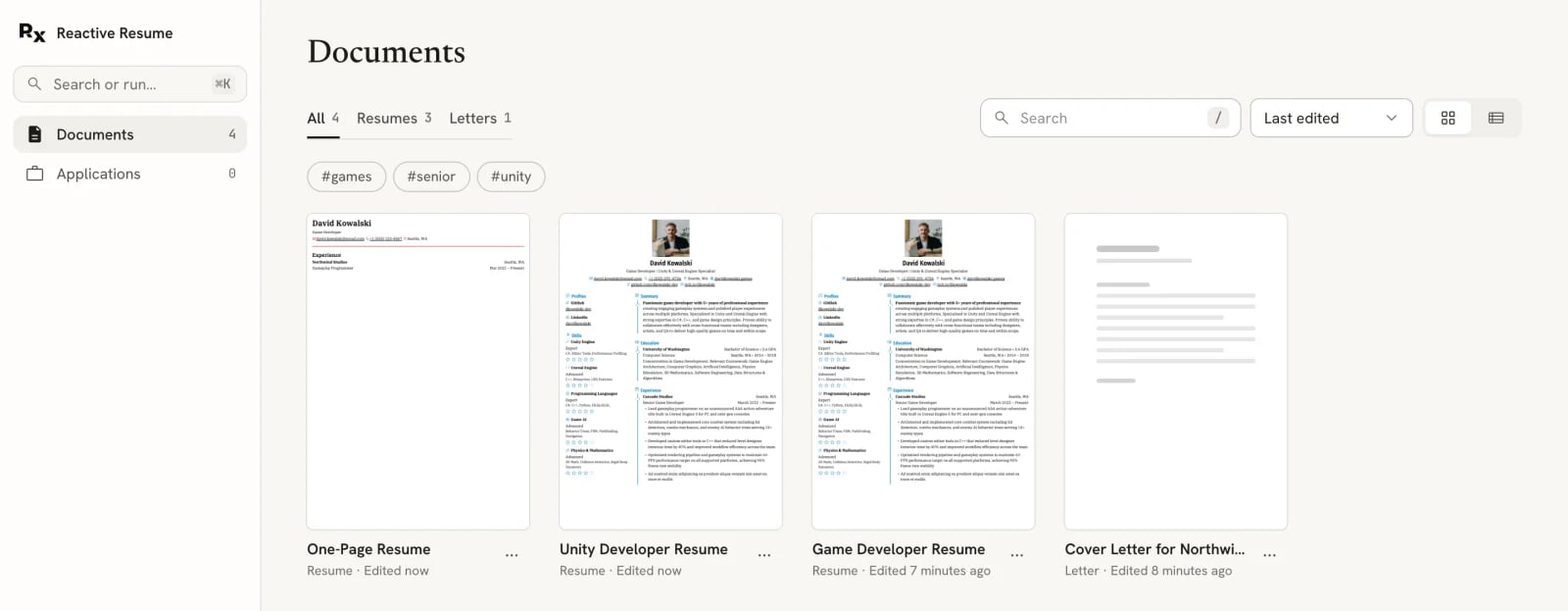
Documents in grid view
Each card shows the document’s first page, its name, its type and when you last edited it. A card made on this device that you haven’t opened yet has a New badge, and a locked document shows a lock icon. If a document is linked to a job application, the company name appears under it.
Open a document
Select a card (or a name in list view) to open it. Resumes open in the resume editor and cover letters in the letter editor. You can also open the card’s ⋯ menu and choose Open.
Find a document
Use the controls above your documents:
Type tabs, search, sort and view
All, Resumes and Letters show one type at a time. Each tab shows how many documents it holds.
Search matches document names, tags, and the company or role of a linked application. Press / anywhere on the page to jump to it.
The sort menu orders documents by Last edited (the default), Name or Created.
If nothing matches, select Clear search and filters to see everything again.
The page address keeps your tab, search, tags and sort, so you can bookmark a filtered view. To search across
documents and applications from anywhere in the app, use the command bar.
Switch between grid and list
Use the two buttons at the right of the toolbar. The grid shows page previews. The list is denser, with Name, Type, Application and Edited columns. Reactive Resume remembers your choice on this device.
Documents in list view
Use the document menu
Every card and row has a ⋯ menu. You can also right-click a card or row (or press and hold on a touch screen) to open the same menu.
The ⋯ menu for a resume
Item
What it does
Open
Opens the document in its editor.
Rename
Lets you edit the name in place.
Duplicate
Makes a copy named ”… (copy)” with the same tags.
Copy for a job…
Resumes only. Makes a copy linked to a job application.
Link to application…
Letters only. Links the letter to one of your open applications, or unlinks it.
Tags…
Adds or removes tags.
Lock editing / Unlock
Protects the document from changes, or allows them again.
Move to Trash
Moves the document to Trash, where you can restore it for 30 days.
Rename a document
1
Choose Rename
Open the document’s ⋯ menu and choose Rename. The name turns into a text field with the current name selected.
Renaming a document in place
2
Type the new name
Names can be up to 100 characters.
3
Save or cancel
Press Enter or click elsewhere to save. Press Esc to keep the old name.
A new blank resume takes its name from its headline until you rename it. After you rename it, the name stays as you typed it.
Duplicate a document
Choose Duplicate to make a separate copy. The copy is named “name (copy)” and keeps the original’s tags. The copy appears at the top of the list with a New badge. Editing the copy never changes the original.Duplicating is useful when you want a short and a long version, a version in another language, or a safe place to try a new template.
Copy a resume for a job
Copy for a job… opens the Copy a resume for a job dialog with that resume selected under Start from. Pick an application under For which job? (or No job yet), check the suggested Name, and select Create and open.
Copy a resume for a job
When you pick an application, the copy is linked to it and Check uses that job’s posting. The original stays unchanged. The copy opens for manual editing; if you already have a usable AI connection, the assistant also opens with the job’s context. For a saved job, this copy becomes its prepared resume. For the full workflow, see Tailoring a resume for a job.
Lock a document
Choose Lock editing to protect a document you’ve already sent, so it can’t change by accident. While a document is locked:
its card shows a lock icon;
Rename, Tags…, Link to application… and Move to Trash are unavailable;
the editor shows it read-only. In the resume editor a note reads “Locked. Unlock to edit.” with an Unlock button.
You can still open, duplicate and download it. Choose Unlock in the same menu to edit it again.
A locked resume and its menu
Remove a document
Choose Move to Trash. The document leaves Documents right away and a message appears with Undo. Documents stay in Trash for 30 days before they’re deleted for good. See Using the Trash.
Create a new document
Select New in the sidebar, or press N anywhere outside a text field, to open the New document dialog.
The New document dialog
Import a resume: build a resume from a PDF, Word, JSON or LinkedIn file. See Importing a resume.
Copy a resume for a job: copy one of your resumes, as described above.
New cover letter instead: create a letter. It takes your details and design from the resume you edited most recently. See Writing a cover letter.
Try with a sample resume: create a filled-in example resume to explore.
You can also drop a file anywhere on the Documents page to import it.When preparing a saved job with no existing resume, select Import or create a resume, then import a file or select Start blank. That resume is linked to the saved job and keeps its posting context. No AI connection is required to create, copy or edit a resume manually.
{"docsConfig":{"theme":"mint","$schema":"https://mintlify.com/docs.json","name":"Reactive Resume","description":"A privacy-minded resume builder that is customizable, portable, open-source, and free to use.","colors":{"primary":"#166534","light":"#07C983","dark":"#15803D"},"logo":{"light":"https://mintcdn.com/lazymedia/xQwnX2p0cH0ikg4N/logo/light.svg?fit=max\u0026auto=format\u0026n=xQwnX2p0cH0ikg4N\u0026q=85\u0026s=d1f33b2f1a2e267e216791b900b3be3d","dark":"https://mintcdn.com/lazymedia/xQwnX2p0cH0ikg4N/logo/dark.svg?fit=max\u0026auto=format\u0026n=xQwnX2p0cH0ikg4N\u0026q=85\u0026s=f8c939ac0fc1f02ebda5ae09a983fd55","href":"https://rxresu.me"},"favicon":"https://mintcdn.com/lazymedia/xQwnX2p0cH0ikg4N/favicon.svg?fit=max\u0026auto=format\u0026n=xQwnX2p0cH0ikg4N\u0026q=85\u0026s=b6a2cd8aaf8b312b59627ed7e32c84cd","background":{"decoration":"grid"},"navbar":{"links":[{"href":"https://github.com/reactive-resume/reactive-resume/issues","label":"Support"}],"primary":{"type":"button","label":"Get Started","href":"https://rxresu.me"}},"footer":{"socials":{"website":"https://rxresu.me","github":"https://github.com/reactive-resume/reactive-resume"}},"seo":{"metatags":{"canonical":"https://docs.rxresu.me","og:image":"https://rxresu.me/opengraph/banner.jpg"},"indexing":"navigable"},"fonts":{"heading":{"family":"IBM Plex Sans"},"body":{"family":"IBM Plex Sans"}},"icons":{"library":"lucide"},"contextual":{"options":["copy","view"],"display":"header"},"styling":{"latex":true},"navigation":{"global":{"anchors":[{"anchor":"Reactive Resume","icon":"link","href":"https://rxresu.me"},{"anchor":"Source Code","icon":"github","href":"https://github.com/reactive-resume/reactive-resume"}]},"pages":[]}},"deployment":{"deploymentMetadataValue":{"subdomain":"lazymedia","hasAudioNarration":false,"actualSubdomain":"lazymedia","customDomains":["docs.rxresume.org"],"gitSource":{"type":"github","owner":"pickit420","repo":"reactive-resume-v2","deployBranch":"main","contentDirectory":"docs","isPrivate":true,"mountPath":"","label":""},"feedback":{"thumbs":true},"entitlements":{},"buildId":"6acd5ecec0f93a41cf028e52","clientVersion":"0.0.4344","searchFilterCounts":[{"language":"default","tag":"API Reference","count":191},{"language":"default","tag":"Documentation","count":117},{"language":"default","tag":"Applications","count":35},{"language":"default","tag":"Career","count":30},{"language":"default","tag":"Resumes","count":26},{"language":"default","tag":"Documents","count":24},{"language":"default","tag":"Cover Letters","count":24},{"language":"default","tag":"Comparisons","count":17},{"language":"default","tag":"Agent","count":15},{"language":"default","tag":"Integrations","count":12}]},"assistantConfig":{"enableAskAiButton":false,"enableStarterQuestions":false,"enableAskAiSearchBar":true},"basePath":"","hasChatPermissions":false,"hasWebMcpPermissions":false,"toggles":[{"name":"kill-isr","enabled":true,"variant":{"name":"disabled","enabled":false,"feature_enabled":true},"impressionData":false},{"name":"custom-rbac-roles","enabled":true,"variant":{"name":"disabled","enabled":false,"feature_enabled":true},"impressionData":false},{"name":"agent-mintlify-slack","enabled":true,"variant":{"name":"disabled","enabled":false,"feature_enabled":true},"impressionData":false},{"name":"agent-integrations-settings","enabled":true,"variant":{"name":"disabled","enabled":false,"feature_enabled":true},"impressionData":false},{"name":"rbac-expansion","enabled":true,"variant":{"name":"disabled","enabled":false,"feature_enabled":true},"impressionData":false},{"name":"automations-pr-grouping","enabled":true,"variant":{"name":"disabled","enabled":false,"feature_enabled":true},"impressionData":false},{"name":"custom-prefix","enabled":true,"variant":{"name":"disabled","enabled":false,"feature_enabled":true},"impressionData":false},{"name":"analytics-v7","enabled":true,"variant":{"name":"disabled","enabled":false,"feature_enabled":true},"impressionData":false},{"name":"user-flows-analytics","enabled":true,"variant":{"name":"disabled","enabled":false,"feature_enabled":true},"impressionData":false},{"name":"no-publish-flow","enabled":true,"variant":{"name":"disabled","enabled":false,"feature_enabled":true},"impressionData":false},{"name":"snapshot-serving-live","enabled":true,"variant":{"name":"disabled","enabled":false,"feature_enabled":true},"impressionData":false},{"name":"stripTemperatureMiddleware","enabled":true,"variant":{"name":"disabled","enabled":false,"feature_enabled":true},"impressionData":false},{"name":"support-platform-pylon-zendesk","enabled":true,"variant":{"name":"disabled","enabled":false,"feature_enabled":true},"impressionData":false},{"name":"snapshot-serving","enabled":true,"variant":{"name":"disabled","enabled":false,"feature_enabled":true},"impressionData":false},{"name":"instant-rollback","enabled":true,"variant":{"name":"disabled","enabled":false,"feature_enabled":true},"impressionData":false},{"name":"granular-notifications-server","enabled":true,"variant":{"name":"disabled","enabled":false,"feature_enabled":true},"impressionData":false},{"name":"granular-notifications","enabled":true,"variant":{"name":"disabled","enabled":false,"feature_enabled":true},"impressionData":false},{"name":"automations-fable","enabled":true,"variant":{"name":"disabled","enabled":false,"feature_enabled":true},"impressionData":false},{"name":"fixed-ai-action-pricing","enabled":true,"variant":{"name":"disabled","enabled":false,"feature_enabled":true},"impressionData":false},{"name":"site-roles","enabled":true,"variant":{"name":"disabled","enabled":false,"feature_enabled":true},"impressionData":false},{"name":"automation-resolve-merge-conflict","enabled":true,"variant":{"name":"disabled","enabled":false,"feature_enabled":true},"impressionData":false},{"name":"scoped-publishing","enabled":true,"variant":{"name":"disabled","enabled":false,"feature_enabled":true},"impressionData":false},{"name":"mintql","enabled":true,"variant":{"name":"disabled","enabled":false,"feature_enabled":true},"impressionData":false},{"name":"page-level-analytics","enabled":true,"variant":{"name":"disabled","enabled":false,"feature_enabled":true},"impressionData":false},{"name":"editor-version-history-v2","enabled":true,"variant":{"name":"disabled","enabled":false,"feature_enabled":true},"impressionData":false},{"name":"billing-page-v2","enabled":true,"variant":{"name":"disabled","enabled":false,"feature_enabled":true},"impressionData":false},{"name":"full-page-search","enabled":true,"variant":{"name":"disabled","enabled":false,"feature_enabled":true},"impressionData":false},{"name":"workspace-projects","enabled":true,"variant":{"name":"disabled","enabled":false,"feature_enabled":true},"impressionData":false},{"name":"fork-pr-previews","enabled":true,"variant":{"name":"disabled","enabled":false,"feature_enabled":true},"impressionData":false},{"name":"revalidation-jwt","enabled":true,"variant":{"name":"disabled","enabled":false,"feature_enabled":true},"impressionData":false},{"name":"hobby-abuse-scan","enabled":true,"variant":{"name":"disabled","enabled":false,"feature_enabled":true},"impressionData":false},{"name":"dashboard-inbox","enabled":true,"variant":{"name":"disabled","enabled":false,"feature_enabled":true},"impressionData":false},{"name":"turbopuffer-dual-write","enabled":true,"variant":{"name":"disabled","enabled":false,"feature_enabled":true},"impressionData":false},{"name":"approve-review-flow","enabled":true,"variant":{"name":"disabled","enabled":false,"feature_enabled":true},"impressionData":false},{"name":"editor-metadata","enabled":true,"variant":{"name":"disabled","enabled":false,"feature_enabled":true},"impressionData":false},{"name":"turbopuffer-serve","enabled":true,"variant":{"name":"disabled","enabled":false,"feature_enabled":true},"impressionData":false},{"name":"live-agents","enabled":true,"variant":{"name":"disabled","enabled":false,"feature_enabled":true},"impressionData":false},{"name":"starter-pricing","enabled":true,"variant":{"name":"treatment","enabled":true,"payload":{"type":"string","value":"treatment"},"feature_enabled":true},"impressionData":false},{"name":"llms-txt-v2","enabled":true,"variant":{"name":"disabled","enabled":false,"feature_enabled":true},"impressionData":false},{"name":"wildcard-email-auth","enabled":true,"variant":{"name":"disabled","enabled":false,"feature_enabled":true},"impressionData":false}],"starterQuestions":[],"googleFontsInlined":false},"customCss":[]}
{"page":{"pagePath":"guides/managing-documents","slug":"/guides/managing-documents","pageMetadata":{"title":"Managing your documents","description":"Find, sort, rename, duplicate, lock and remove your resumes and cover letters from the Documents page in Reactive Resume.","href":"/guides/managing-documents"},"description":{"compiledSource":"\"use strict\";\nconst {jsx: _jsx} = arguments[0];\nconst {useMDXComponents: _provideComponents} = arguments[0];\nfunction _createMdxContent(props) {\n const _components = {\n p: \"p\",\n ..._provideComponents(),\n ...props.components\n };\n return _jsx(_components.p, {\n children: \"Find, sort, rename, duplicate, lock and remove your resumes and cover letters from the Documents page in Reactive Resume.\"\n });\n}\nfunction MDXContent(props = {}) {\n const {wrapper: MDXLayout} = {\n ..._provideComponents(),\n ...props.components\n };\n return MDXLayout ? _jsx(MDXLayout, {\n ...props,\n children: _jsx(_createMdxContent, {\n ...props\n })\n }) : _createMdxContent(props);\n}\nreturn {\n default: MDXContent\n};\n","frontmatter":{},"scope":{}},"pageType":"default","mdx":{"mdxSource":{"compiledSource":"\"use strict\";const{Fragment:_Fragment,jsx:_jsx,jsxs:_jsxs}=arguments[0];const{useMDXComponents:_provideComponents}=arguments[0];function _createMdxContent(props){const _components={a:`a`,em:`em`,li:`li`,p:`p`,strong:`strong`,tbody:`tbody`,td:`td`,th:`th`,thead:`thead`,tr:`tr`,ul:`ul`,..._provideComponents(),...props.components},{Frame,Heading,OptimizedImage,Step,Steps,Table,Tip}=_components;if(!Frame)_missingMdxReference(`Frame`,true);if(!Heading)_missingMdxReference(`Heading`,true);if(!OptimizedImage)_missingMdxReference(`OptimizedImage`,true);if(!Step)_missingMdxReference(`Step`,true);if(!Steps)_missingMdxReference(`Steps`,true);if(!Table)_missingMdxReference(`Table`,true);if(!Tip)_missingMdxReference(`Tip`,true);return _jsxs(_Fragment,{children:[_jsxs(_components.p,{children:[_jsx(_components.strong,{children:`Documents`}),` is the page you see after signing in. It holds every resume and cover letter in your account, so you can keep one version per role, company or language and find the right one fast.`]}),`\n`,_jsx(Frame,{caption:`Documents in grid view`,children:_jsx(OptimizedImage,{src:`https://mintcdn.com/lazymedia/kg_VLIC57jHE8Lcr/images/guides/managing-documents/documents-grid.webp?fit=max\u0026auto=format\u0026n=kg_VLIC57jHE8Lcr\u0026q=85\u0026s=ec62ca68d4c55096566efdc6f1f35b22`,alt:`The Documents page with All, Resumes and Letters tabs, a search field, a sort menu, grid and list buttons, tag chips, and four document cards`,\"data-og-width\":`1600`,width:`1600`,\"data-og-height\":`623`,height:`623`,\"data-path\":`images/guides/managing-documents/documents-grid.webp`,\"data-optimize\":`true`,\"data-opv\":`3`,srcset:`https://mintcdn.com/lazymedia/kg_VLIC57jHE8Lcr/images/guides/managing-documents/documents-grid.webp?w=280\u0026fit=max\u0026auto=format\u0026n=kg_VLIC57jHE8Lcr\u0026q=85\u0026s=e9a10b5318a883deff8208de94ea6e21 280w, https://mintcdn.com/lazymedia/kg_VLIC57jHE8Lcr/images/guides/managing-documents/documents-grid.webp?w=560\u0026fit=max\u0026auto=format\u0026n=kg_VLIC57jHE8Lcr\u0026q=85\u0026s=1f4d134a8469760da10cd81f5ba0887f 560w, https://mintcdn.com/lazymedia/kg_VLIC57jHE8Lcr/images/guides/managing-documents/documents-grid.webp?w=840\u0026fit=max\u0026auto=format\u0026n=kg_VLIC57jHE8Lcr\u0026q=85\u0026s=2b58205bfa153b5a2a52fe172a563513 840w, https://mintcdn.com/lazymedia/kg_VLIC57jHE8Lcr/images/guides/managing-documents/documents-grid.webp?w=1100\u0026fit=max\u0026auto=format\u0026n=kg_VLIC57jHE8Lcr\u0026q=85\u0026s=0888a9e84fdb8332ffb3c6d77b2f5f77 1100w, https://mintcdn.com/lazymedia/kg_VLIC57jHE8Lcr/images/guides/managing-documents/documents-grid.webp?w=1650\u0026fit=max\u0026auto=format\u0026n=kg_VLIC57jHE8Lcr\u0026q=85\u0026s=76f152cff4275579ffa70f3a9714ad99 1650w, https://mintcdn.com/lazymedia/kg_VLIC57jHE8Lcr/images/guides/managing-documents/documents-grid.webp?w=2500\u0026fit=max\u0026auto=format\u0026n=kg_VLIC57jHE8Lcr\u0026q=85\u0026s=d557e2a1b50d2dea9c42c00ed1a0fbda 2500w`})}),`\n`,_jsxs(_components.p,{children:[`Each card shows the document’s first page, its name, its type and when you last edited it. A card made on this device that you haven’t opened yet has a `,_jsx(_components.strong,{children:`New`}),` badge, and a locked document shows a lock icon. If a document is linked to a job application, the company name appears under it.`]}),`\n`,_jsx(Heading,{level:`2`,id:`open-a-document`,children:`Open a document`}),`\n`,_jsxs(_components.p,{children:[`Select a card (or a name in list view) to open it. Resumes open in the resume editor and cover letters in the letter editor. You can also open the card’s `,_jsx(_components.strong,{children:`⋯`}),` menu and choose `,_jsx(_components.strong,{children:`Open`}),`.`]}),`\n`,_jsx(Heading,{level:`2`,id:`find-a-document`,children:`Find a document`}),`\n`,_jsx(_components.p,{children:`Use the controls above your documents:`}),`\n`,_jsx(Frame,{caption:`Type tabs, search, sort and view`,children:_jsx(OptimizedImage,{src:`https://mintcdn.com/lazymedia/kg_VLIC57jHE8Lcr/images/guides/managing-documents/documents-toolbar.webp?fit=max\u0026auto=format\u0026n=kg_VLIC57jHE8Lcr\u0026q=85\u0026s=13de3b2e693b375ba3256d9b74b10be4`,alt:`The Documents toolbar with All 4, Resumes 3 and Letters 1 tabs, a Search field showing the slash shortcut, a Last edited sort menu, grid and list buttons, and tag chips below`,\"data-og-width\":`1600`,width:`1600`,\"data-og-height\":`140`,height:`140`,\"data-path\":`images/guides/managing-documents/documents-toolbar.webp`,\"data-optimize\":`true`,\"data-opv\":`3`,srcset:`https://mintcdn.com/lazymedia/kg_VLIC57jHE8Lcr/images/guides/managing-documents/documents-toolbar.webp?w=280\u0026fit=max\u0026auto=format\u0026n=kg_VLIC57jHE8Lcr\u0026q=85\u0026s=10d0fea812d6a7d78895b6258f57bee0 280w, https://mintcdn.com/lazymedia/kg_VLIC57jHE8Lcr/images/guides/managing-documents/documents-toolbar.webp?w=560\u0026fit=max\u0026auto=format\u0026n=kg_VLIC57jHE8Lcr\u0026q=85\u0026s=befe9f96702dcba9108d7f6ff5267500 560w, https://mintcdn.com/lazymedia/kg_VLIC57jHE8Lcr/images/guides/managing-documents/documents-toolbar.webp?w=840\u0026fit=max\u0026auto=format\u0026n=kg_VLIC57jHE8Lcr\u0026q=85\u0026s=59d30ec49ee98bc59c04d37de82d74a5 840w, https://mintcdn.com/lazymedia/kg_VLIC57jHE8Lcr/images/guides/managing-documents/documents-toolbar.webp?w=1100\u0026fit=max\u0026auto=format\u0026n=kg_VLIC57jHE8Lcr\u0026q=85\u0026s=0f61d0ddd544703c410f546654f0916c 1100w, https://mintcdn.com/lazymedia/kg_VLIC57jHE8Lcr/images/guides/managing-documents/documents-toolbar.webp?w=1650\u0026fit=max\u0026auto=format\u0026n=kg_VLIC57jHE8Lcr\u0026q=85\u0026s=8bf967a7951d18af480de0383da63c09 1650w, https://mintcdn.com/lazymedia/kg_VLIC57jHE8Lcr/images/guides/managing-documents/documents-toolbar.webp?w=2500\u0026fit=max\u0026auto=format\u0026n=kg_VLIC57jHE8Lcr\u0026q=85\u0026s=8282be752fc12154c0b08b30ec337daf 2500w`})}),`\n`,_jsxs(_components.ul,{children:[`\n`,_jsxs(_components.li,{children:[_jsx(_components.strong,{children:`All`}),`, `,_jsx(_components.strong,{children:`Resumes`}),` and `,_jsx(_components.strong,{children:`Letters`}),` show one type at a time. Each tab shows how many documents it holds.`]}),`\n`,_jsxs(_components.li,{children:[_jsx(_components.strong,{children:`Search`}),` matches document names, tags, and the company or role of a linked application. Press `,_jsx(`kbd`,{children:`/`}),` anywhere on the page to jump to it.`]}),`\n`,_jsxs(_components.li,{children:[`The sort menu orders documents by `,_jsx(_components.strong,{children:`Last edited`}),` (the default), `,_jsx(_components.strong,{children:`Name`}),` or `,_jsx(_components.strong,{children:`Created`}),`.`]}),`\n`,_jsxs(_components.li,{children:[`Tag chips appear once any document has a tag. See `,_jsx(_components.a,{href:`/guides/organizing-with-tags`,children:`Organizing documents with tags`}),`.`]}),`\n`]}),`\n`,_jsxs(_components.p,{children:[`If nothing matches, select `,_jsx(_components.strong,{children:`Clear search and filters`}),` to see everything again.`]}),`\n`,_jsx(Tip,{children:_jsxs(_components.p,{children:[`The page address keeps your tab, search, tags and sort, so you can bookmark a filtered view. To search across\ndocuments and applications from anywhere in the app, use the `,_jsx(_components.a,{href:`/guides/using-the-command-bar`,children:`command bar`}),`.`]})}),`\n`,_jsx(Heading,{level:`2`,id:`switch-between-grid-and-list`,children:`Switch between grid and list`}),`\n`,_jsxs(_components.p,{children:[`Use the two buttons at the right of the toolbar. The grid shows page previews. The list is denser, with `,_jsx(_components.strong,{children:`Name`}),`, `,_jsx(_components.strong,{children:`Type`}),`, `,_jsx(_components.strong,{children:`Application`}),` and `,_jsx(_components.strong,{children:`Edited`}),` columns. Reactive Resume remembers your choice on this device.`]}),`\n`,_jsx(Frame,{caption:`Documents in list view`,children:_jsx(OptimizedImage,{src:`https://mintcdn.com/lazymedia/kg_VLIC57jHE8Lcr/images/guides/managing-documents/documents-list-view.webp?fit=max\u0026auto=format\u0026n=kg_VLIC57jHE8Lcr\u0026q=85\u0026s=9553cbdd3784db540f2f6d2d9ed01377`,alt:`Documents in list view with columns for Name, Type, Application and Edited, and a menu button at the end of each row`,\"data-og-width\":`1600`,width:`1600`,\"data-og-height\":`316`,height:`316`,\"data-path\":`images/guides/managing-documents/documents-list-view.webp`,\"data-optimize\":`true`,\"data-opv\":`3`,srcset:`https://mintcdn.com/lazymedia/kg_VLIC57jHE8Lcr/images/guides/managing-documents/documents-list-view.webp?w=280\u0026fit=max\u0026auto=format\u0026n=kg_VLIC57jHE8Lcr\u0026q=85\u0026s=7e25ca7095a90d8c74a30663992e9cb5 280w, https://mintcdn.com/lazymedia/kg_VLIC57jHE8Lcr/images/guides/managing-documents/documents-list-view.webp?w=560\u0026fit=max\u0026auto=format\u0026n=kg_VLIC57jHE8Lcr\u0026q=85\u0026s=c39d533602f55460b17b5b09962857c6 560w, https://mintcdn.com/lazymedia/kg_VLIC57jHE8Lcr/images/guides/managing-documents/documents-list-view.webp?w=840\u0026fit=max\u0026auto=format\u0026n=kg_VLIC57jHE8Lcr\u0026q=85\u0026s=a07f82b65fecca3c354393b7e779ede8 840w, https://mintcdn.com/lazymedia/kg_VLIC57jHE8Lcr/images/guides/managing-documents/documents-list-view.webp?w=1100\u0026fit=max\u0026auto=format\u0026n=kg_VLIC57jHE8Lcr\u0026q=85\u0026s=7c93f0bb3c91c9c054683dc3d18b5cdf 1100w, https://mintcdn.com/lazymedia/kg_VLIC57jHE8Lcr/images/guides/managing-documents/documents-list-view.webp?w=1650\u0026fit=max\u0026auto=format\u0026n=kg_VLIC57jHE8Lcr\u0026q=85\u0026s=e1e017ff3a9cba7fc3e9b919ee62325b 1650w, https://mintcdn.com/lazymedia/kg_VLIC57jHE8Lcr/images/guides/managing-documents/documents-list-view.webp?w=2500\u0026fit=max\u0026auto=format\u0026n=kg_VLIC57jHE8Lcr\u0026q=85\u0026s=dd107fc33ef3389a41ffc482d02db95b 2500w`})}),`\n`,_jsx(Heading,{level:`2`,id:`use-the-document-menu`,children:`Use the document menu`}),`\n`,_jsxs(_components.p,{children:[`Every card and row has a `,_jsx(_components.strong,{children:`⋯`}),` menu. You can also right-click a card or row (or press and hold on a touch screen) to open the same menu.`]}),`\n`,_jsx(Frame,{caption:`The ⋯ menu for a resume`,children:_jsx(OptimizedImage,{src:`https://mintcdn.com/lazymedia/kg_VLIC57jHE8Lcr/images/guides/managing-documents/document-options-menu.webp?fit=max\u0026auto=format\u0026n=kg_VLIC57jHE8Lcr\u0026q=85\u0026s=44fbef1ba228b2b2ab0ffd88843564b0`,alt:`The options menu for Game Developer Resume with Open, Rename, Duplicate, Copy for a job, Tags, Lock editing and Move to Trash`,\"data-og-width\":`544`,width:`544`,\"data-og-height\":`692`,height:`692`,\"data-path\":`images/guides/managing-documents/document-options-menu.webp`,\"data-optimize\":`true`,\"data-opv\":`3`,srcset:`https://mintcdn.com/lazymedia/kg_VLIC57jHE8Lcr/images/guides/managing-documents/document-options-menu.webp?w=280\u0026fit=max\u0026auto=format\u0026n=kg_VLIC57jHE8Lcr\u0026q=85\u0026s=9b086b36a02f05de0746cbc41ced609e 280w, https://mintcdn.com/lazymedia/kg_VLIC57jHE8Lcr/images/guides/managing-documents/document-options-menu.webp?w=560\u0026fit=max\u0026auto=format\u0026n=kg_VLIC57jHE8Lcr\u0026q=85\u0026s=26e11372013e6b4f27dde22c39b26f88 560w, https://mintcdn.com/lazymedia/kg_VLIC57jHE8Lcr/images/guides/managing-documents/document-options-menu.webp?w=840\u0026fit=max\u0026auto=format\u0026n=kg_VLIC57jHE8Lcr\u0026q=85\u0026s=e9f98139f7a51ffb8524be6ae1295913 840w, https://mintcdn.com/lazymedia/kg_VLIC57jHE8Lcr/images/guides/managing-documents/document-options-menu.webp?w=1100\u0026fit=max\u0026auto=format\u0026n=kg_VLIC57jHE8Lcr\u0026q=85\u0026s=a21bc1a1c2e0a5403290fdda1012185e 1100w, https://mintcdn.com/lazymedia/kg_VLIC57jHE8Lcr/images/guides/managing-documents/document-options-menu.webp?w=1650\u0026fit=max\u0026auto=format\u0026n=kg_VLIC57jHE8Lcr\u0026q=85\u0026s=47a12f9197de77c78b4183b621d19910 1650w, https://mintcdn.com/lazymedia/kg_VLIC57jHE8Lcr/images/guides/managing-documents/document-options-menu.webp?w=2500\u0026fit=max\u0026auto=format\u0026n=kg_VLIC57jHE8Lcr\u0026q=85\u0026s=d31403e1aecfca06275cd9f030855e90 2500w`})}),`\n`,_jsxs(Table,{children:[_jsx(_components.thead,{children:_jsxs(_components.tr,{children:[_jsx(_components.th,{children:`Item`}),_jsx(_components.th,{children:`What it does`})]})}),_jsxs(_components.tbody,{children:[_jsxs(_components.tr,{children:[_jsx(_components.td,{children:_jsx(_components.strong,{children:`Open`})}),_jsx(_components.td,{children:`Opens the document in its editor.`})]}),_jsxs(_components.tr,{children:[_jsx(_components.td,{children:_jsx(_components.strong,{children:`Rename`})}),_jsx(_components.td,{children:`Lets you edit the name in place.`})]}),_jsxs(_components.tr,{children:[_jsx(_components.td,{children:_jsx(_components.strong,{children:`Duplicate`})}),_jsx(_components.td,{children:`Makes a copy named ”… (copy)” with the same tags.`})]}),_jsxs(_components.tr,{children:[_jsx(_components.td,{children:_jsx(_components.strong,{children:`Copy for a job…`})}),_jsx(_components.td,{children:`Resumes only. Makes a copy linked to a job application.`})]}),_jsxs(_components.tr,{children:[_jsx(_components.td,{children:_jsx(_components.strong,{children:`Link to application…`})}),_jsx(_components.td,{children:`Letters only. Links the letter to one of your open applications, or unlinks it.`})]}),_jsxs(_components.tr,{children:[_jsx(_components.td,{children:_jsx(_components.strong,{children:`Tags…`})}),_jsx(_components.td,{children:`Adds or removes tags.`})]}),_jsxs(_components.tr,{children:[_jsxs(_components.td,{children:[_jsx(_components.strong,{children:`Lock editing`}),` / `,_jsx(_components.strong,{children:`Unlock`})]}),_jsx(_components.td,{children:`Protects the document from changes, or allows them again.`})]}),_jsxs(_components.tr,{children:[_jsx(_components.td,{children:_jsx(_components.strong,{children:`Move to Trash`})}),_jsx(_components.td,{children:`Moves the document to Trash, where you can restore it for 30 days.`})]})]})]}),`\n`,_jsx(Heading,{level:`2`,id:`rename-a-document`,children:`Rename a document`}),`\n`,_jsxs(Steps,{children:[_jsxs(Step,{title:`Choose Rename`,children:[_jsxs(_components.p,{children:[`Open the document’s `,_jsx(_components.strong,{children:`⋯`}),` menu and choose `,_jsx(_components.strong,{children:`Rename`}),`. The name turns into a text field with the current name selected.`]}),_jsx(Frame,{caption:`Renaming a document in place`,children:_jsx(OptimizedImage,{src:`https://mintcdn.com/lazymedia/kg_VLIC57jHE8Lcr/images/guides/managing-documents/rename-inline.webp?fit=max\u0026auto=format\u0026n=kg_VLIC57jHE8Lcr\u0026q=85\u0026s=5dd6a4a80859a13523796b3d367b4b47`,alt:`A document card with its name field in edit mode showing Unity Developer Resume`,\"data-og-width\":`480`,width:`480`,\"data-og-height\":`152`,height:`152`,\"data-path\":`images/guides/managing-documents/rename-inline.webp`,\"data-optimize\":`true`,\"data-opv\":`3`,srcset:`https://mintcdn.com/lazymedia/kg_VLIC57jHE8Lcr/images/guides/managing-documents/rename-inline.webp?w=280\u0026fit=max\u0026auto=format\u0026n=kg_VLIC57jHE8Lcr\u0026q=85\u0026s=d757bc0385e7f47117ca608aafccd496 280w, https://mintcdn.com/lazymedia/kg_VLIC57jHE8Lcr/images/guides/managing-documents/rename-inline.webp?w=560\u0026fit=max\u0026auto=format\u0026n=kg_VLIC57jHE8Lcr\u0026q=85\u0026s=26200249884ef5b375bb224e7e5c7470 560w, https://mintcdn.com/lazymedia/kg_VLIC57jHE8Lcr/images/guides/managing-documents/rename-inline.webp?w=840\u0026fit=max\u0026auto=format\u0026n=kg_VLIC57jHE8Lcr\u0026q=85\u0026s=12cb9baa73c0a5fb8ac6fc26ba52a0c9 840w, https://mintcdn.com/lazymedia/kg_VLIC57jHE8Lcr/images/guides/managing-documents/rename-inline.webp?w=1100\u0026fit=max\u0026auto=format\u0026n=kg_VLIC57jHE8Lcr\u0026q=85\u0026s=af6607c1fd00c5cff7bdb9156935376c 1100w, https://mintcdn.com/lazymedia/kg_VLIC57jHE8Lcr/images/guides/managing-documents/rename-inline.webp?w=1650\u0026fit=max\u0026auto=format\u0026n=kg_VLIC57jHE8Lcr\u0026q=85\u0026s=aede5b138f86c1ca27260f29f749de12 1650w, https://mintcdn.com/lazymedia/kg_VLIC57jHE8Lcr/images/guides/managing-documents/rename-inline.webp?w=2500\u0026fit=max\u0026auto=format\u0026n=kg_VLIC57jHE8Lcr\u0026q=85\u0026s=f9b6ba4a45d32d7334f6395f75a6a588 2500w`})})]}),_jsx(Step,{title:`Type the new name`,children:_jsx(_components.p,{children:`Names can be up to 100 characters.`})}),_jsx(Step,{title:`Save or cancel`,children:_jsxs(_components.p,{children:[`Press `,_jsx(`kbd`,{children:`Enter`}),` or click elsewhere to save. Press `,_jsx(`kbd`,{children:`Esc`}),` to keep the old name.`]})})]}),`\n`,_jsx(_components.p,{children:`A new blank resume takes its name from its headline until you rename it. After you rename it, the name stays as you typed it.`}),`\n`,_jsx(Heading,{level:`2`,id:`duplicate-a-document`,children:`Duplicate a document`}),`\n`,_jsxs(_components.p,{children:[`Choose `,_jsx(_components.strong,{children:`Duplicate`}),` to make a separate copy. The copy is named “`,_jsx(_components.em,{children:`name`}),` (copy)” and keeps the original’s tags. The copy appears at the top of the list with a `,_jsx(_components.strong,{children:`New`}),` badge. Editing the copy never changes the original.`]}),`\n`,_jsx(_components.p,{children:`Duplicating is useful when you want a short and a long version, a version in another language, or a safe place to try a new template.`}),`\n`,_jsx(Heading,{level:`2`,id:`copy-a-resume-for-a-job`,children:`Copy a resume for a job`}),`\n`,_jsxs(_components.p,{children:[_jsx(_components.strong,{children:`Copy for a job…`}),` opens the `,_jsx(_components.strong,{children:`Copy a resume for a job`}),` dialog with that resume selected under `,_jsx(_components.strong,{children:`Start from`}),`. Pick an application under `,_jsx(_components.strong,{children:`For which job?`}),` (or `,_jsx(_components.strong,{children:`No job yet`}),`), check the suggested `,_jsx(_components.strong,{children:`Name`}),`, and select `,_jsx(_components.strong,{children:`Create and open`}),`.`]}),`\n`,_jsx(Frame,{caption:`Copy a resume for a job`,children:_jsx(OptimizedImage,{src:`https://mintcdn.com/lazymedia/kg_VLIC57jHE8Lcr/images/guides/managing-documents/copy-for-a-job.webp?fit=max\u0026auto=format\u0026n=kg_VLIC57jHE8Lcr\u0026q=85\u0026s=ae6ec478a923554d1dd2deaf2f2775d5`,alt:`The Copy a resume for a job dialog with a list of resumes to start from, a No job yet chip, a Name field and a Create and open button`,\"data-og-width\":`1280`,width:`1280`,\"data-og-height\":`1118`,height:`1118`,\"data-path\":`images/guides/managing-documents/copy-for-a-job.webp`,\"data-optimize\":`true`,\"data-opv\":`3`,srcset:`https://mintcdn.com/lazymedia/kg_VLIC57jHE8Lcr/images/guides/managing-documents/copy-for-a-job.webp?w=280\u0026fit=max\u0026auto=format\u0026n=kg_VLIC57jHE8Lcr\u0026q=85\u0026s=0ac253300adbc88f3f9c0941ba23c2fd 280w, https://mintcdn.com/lazymedia/kg_VLIC57jHE8Lcr/images/guides/managing-documents/copy-for-a-job.webp?w=560\u0026fit=max\u0026auto=format\u0026n=kg_VLIC57jHE8Lcr\u0026q=85\u0026s=e86cab73b972fcc91ae0cd2de9b4f15f 560w, https://mintcdn.com/lazymedia/kg_VLIC57jHE8Lcr/images/guides/managing-documents/copy-for-a-job.webp?w=840\u0026fit=max\u0026auto=format\u0026n=kg_VLIC57jHE8Lcr\u0026q=85\u0026s=64b1cca71539981c9db58a5621442720 840w, https://mintcdn.com/lazymedia/kg_VLIC57jHE8Lcr/images/guides/managing-documents/copy-for-a-job.webp?w=1100\u0026fit=max\u0026auto=format\u0026n=kg_VLIC57jHE8Lcr\u0026q=85\u0026s=a006af52b35da8adca3256a8af2400d2 1100w, https://mintcdn.com/lazymedia/kg_VLIC57jHE8Lcr/images/guides/managing-documents/copy-for-a-job.webp?w=1650\u0026fit=max\u0026auto=format\u0026n=kg_VLIC57jHE8Lcr\u0026q=85\u0026s=38a884e54dbaf20d60344c3772ef7067 1650w, https://mintcdn.com/lazymedia/kg_VLIC57jHE8Lcr/images/guides/managing-documents/copy-for-a-job.webp?w=2500\u0026fit=max\u0026auto=format\u0026n=kg_VLIC57jHE8Lcr\u0026q=85\u0026s=fadf471b21179586fb6e84fc2c205ba1 2500w`})}),`\n`,_jsxs(_components.p,{children:[`When you pick an application, the copy is linked to it and Check uses that job’s posting. The original stays unchanged. The copy opens for manual editing; if you already have a usable AI connection, the assistant also opens with the job’s context. For a saved job, this copy becomes its prepared resume. For the full workflow, see `,_jsx(_components.a,{href:`/guides/tailoring-a-resume-for-a-job`,children:`Tailoring a resume for a job`}),`.`]}),`\n`,_jsx(Heading,{level:`2`,id:`lock-a-document`,children:`Lock a document`}),`\n`,_jsxs(_components.p,{children:[`Choose `,_jsx(_components.strong,{children:`Lock editing`}),` to protect a document you’ve already sent, so it can’t change by accident. While a document is locked:`]}),`\n`,_jsxs(_components.ul,{children:[`\n`,_jsx(_components.li,{children:`its card shows a lock icon;`}),`\n`,_jsxs(_components.li,{children:[_jsx(_components.strong,{children:`Rename`}),`, `,_jsx(_components.strong,{children:`Tags…`}),`, `,_jsx(_components.strong,{children:`Link to application…`}),` and `,_jsx(_components.strong,{children:`Move to Trash`}),` are unavailable;`]}),`\n`,_jsxs(_components.li,{children:[`the editor shows it read-only. In the resume editor a note reads “Locked. Unlock to edit.” with an `,_jsx(_components.strong,{children:`Unlock`}),` button.`]}),`\n`]}),`\n`,_jsxs(_components.p,{children:[`You can still open, duplicate and download it. Choose `,_jsx(_components.strong,{children:`Unlock`}),` in the same menu to edit it again.`]}),`\n`,_jsx(Frame,{caption:`A locked resume and its menu`,children:_jsx(OptimizedImage,{src:`https://mintcdn.com/lazymedia/kg_VLIC57jHE8Lcr/images/guides/managing-documents/locked-document-menu.webp?fit=max\u0026auto=format\u0026n=kg_VLIC57jHE8Lcr\u0026q=85\u0026s=f0eece7d8b8fdc035021825e1e9e4473`,alt:`A resume card with a lock icon and its menu showing Rename, Tags and Move to Trash unavailable and an Unlock item`,\"data-og-width\":`544`,width:`544`,\"data-og-height\":`1264`,height:`1264`,\"data-path\":`images/guides/managing-documents/locked-document-menu.webp`,\"data-optimize\":`true`,\"data-opv\":`3`,srcset:`https://mintcdn.com/lazymedia/kg_VLIC57jHE8Lcr/images/guides/managing-documents/locked-document-menu.webp?w=280\u0026fit=max\u0026auto=format\u0026n=kg_VLIC57jHE8Lcr\u0026q=85\u0026s=7fe5e70584688f3fa97620fa5bd234f0 280w, https://mintcdn.com/lazymedia/kg_VLIC57jHE8Lcr/images/guides/managing-documents/locked-document-menu.webp?w=560\u0026fit=max\u0026auto=format\u0026n=kg_VLIC57jHE8Lcr\u0026q=85\u0026s=52f164ee2f26397607014af4dc1f7242 560w, https://mintcdn.com/lazymedia/kg_VLIC57jHE8Lcr/images/guides/managing-documents/locked-document-menu.webp?w=840\u0026fit=max\u0026auto=format\u0026n=kg_VLIC57jHE8Lcr\u0026q=85\u0026s=6cff954467ae7f90454273e0f9afb772 840w, https://mintcdn.com/lazymedia/kg_VLIC57jHE8Lcr/images/guides/managing-documents/locked-document-menu.webp?w=1100\u0026fit=max\u0026auto=format\u0026n=kg_VLIC57jHE8Lcr\u0026q=85\u0026s=98dfa5cda0f5c05e6f428e8795b091f3 1100w, https://mintcdn.com/lazymedia/kg_VLIC57jHE8Lcr/images/guides/managing-documents/locked-document-menu.webp?w=1650\u0026fit=max\u0026auto=format\u0026n=kg_VLIC57jHE8Lcr\u0026q=85\u0026s=2e24d4ad065b0719e704c69d73f5c96b 1650w, https://mintcdn.com/lazymedia/kg_VLIC57jHE8Lcr/images/guides/managing-documents/locked-document-menu.webp?w=2500\u0026fit=max\u0026auto=format\u0026n=kg_VLIC57jHE8Lcr\u0026q=85\u0026s=eb29a178852a101c0ae30681d473cbc4 2500w`})}),`\n`,_jsx(Heading,{level:`2`,id:`remove-a-document`,children:`Remove a document`}),`\n`,_jsxs(_components.p,{children:[`Choose `,_jsx(_components.strong,{children:`Move to Trash`}),`. The document leaves Documents right away and a message appears with `,_jsx(_components.strong,{children:`Undo`}),`. Documents stay in Trash for 30 days before they’re deleted for good. See `,_jsx(_components.a,{href:`/guides/using-the-trash`,children:`Using the Trash`}),`.`]}),`\n`,_jsx(Heading,{level:`2`,id:`create-a-new-document`,children:`Create a new document`}),`\n`,_jsxs(_components.p,{children:[`Select `,_jsx(_components.strong,{children:`New`}),` in the sidebar, or press `,_jsx(`kbd`,{children:`N`}),` anywhere outside a text field, to open the `,_jsx(_components.strong,{children:`New document`}),` dialog.`]}),`\n`,_jsx(Frame,{caption:`The New document dialog`,children:_jsx(OptimizedImage,{src:`https://mintcdn.com/lazymedia/kg_VLIC57jHE8Lcr/images/guides/managing-documents/new-document-dialog.webp?fit=max\u0026auto=format\u0026n=kg_VLIC57jHE8Lcr\u0026q=85\u0026s=406c3e058507e21c5d5b91589526b2fd`,alt:`The New document dialog with Import a resume, Copy a resume for a job, Start blank, New cover letter instead and Try with a sample resume`,\"data-og-width\":`1280`,width:`1280`,\"data-og-height\":`720`,height:`720`,\"data-path\":`images/guides/managing-documents/new-document-dialog.webp`,\"data-optimize\":`true`,\"data-opv\":`3`,srcset:`https://mintcdn.com/lazymedia/kg_VLIC57jHE8Lcr/images/guides/managing-documents/new-document-dialog.webp?w=280\u0026fit=max\u0026auto=format\u0026n=kg_VLIC57jHE8Lcr\u0026q=85\u0026s=1905f97631601bea095bedeac54cd740 280w, https://mintcdn.com/lazymedia/kg_VLIC57jHE8Lcr/images/guides/managing-documents/new-document-dialog.webp?w=560\u0026fit=max\u0026auto=format\u0026n=kg_VLIC57jHE8Lcr\u0026q=85\u0026s=c4d0c72a06dd9005adc59c1567e8c8d5 560w, https://mintcdn.com/lazymedia/kg_VLIC57jHE8Lcr/images/guides/managing-documents/new-document-dialog.webp?w=840\u0026fit=max\u0026auto=format\u0026n=kg_VLIC57jHE8Lcr\u0026q=85\u0026s=c1eb25c7c68282bfc9266482b59d8ae6 840w, https://mintcdn.com/lazymedia/kg_VLIC57jHE8Lcr/images/guides/managing-documents/new-document-dialog.webp?w=1100\u0026fit=max\u0026auto=format\u0026n=kg_VLIC57jHE8Lcr\u0026q=85\u0026s=e22379c8a824aa912b3a52940fea04ee 1100w, https://mintcdn.com/lazymedia/kg_VLIC57jHE8Lcr/images/guides/managing-documents/new-document-dialog.webp?w=1650\u0026fit=max\u0026auto=format\u0026n=kg_VLIC57jHE8Lcr\u0026q=85\u0026s=e4a711b0433bcb2b6d78a75e310e505e 1650w, https://mintcdn.com/lazymedia/kg_VLIC57jHE8Lcr/images/guides/managing-documents/new-document-dialog.webp?w=2500\u0026fit=max\u0026auto=format\u0026n=kg_VLIC57jHE8Lcr\u0026q=85\u0026s=1761b9e111c1f635b0c03e515af3911a 2500w`})}),`\n`,_jsxs(_components.ul,{children:[`\n`,_jsxs(_components.li,{children:[_jsx(_components.strong,{children:`Import a resume`}),`: build a resume from a PDF, Word, JSON or LinkedIn file. See `,_jsx(_components.a,{href:`/guides/importing-resumes`,children:`Importing a resume`}),`.`]}),`\n`,_jsxs(_components.li,{children:[_jsx(_components.strong,{children:`Copy a resume for a job`}),`: copy one of your resumes, as described above.`]}),`\n`,_jsxs(_components.li,{children:[_jsx(_components.strong,{children:`Start blank`}),`: create an empty resume and open it. See `,_jsx(_components.a,{href:`/guides/creating-your-first-resume`,children:`Creating your first resume`}),`.`]}),`\n`,_jsxs(_components.li,{children:[_jsx(_components.strong,{children:`New cover letter instead`}),`: create a letter. It takes your details and design from the resume you edited most recently. See `,_jsx(_components.a,{href:`/guides/writing-a-cover-letter`,children:`Writing a cover letter`}),`.`]}),`\n`,_jsxs(_components.li,{children:[_jsx(_components.strong,{children:`Try with a sample resume`}),`: create a filled-in example resume to explore.`]}),`\n`]}),`\n`,_jsx(_components.p,{children:`You can also drop a file anywhere on the Documents page to import it.`}),`\n`,_jsxs(_components.p,{children:[`When preparing a saved job with no existing resume, select `,_jsx(_components.strong,{children:`Import or create a resume`}),`, then import a file or select `,_jsx(_components.strong,{children:`Start blank`}),`. That resume is linked to the saved job and keeps its posting context. No AI connection is required to create, copy or edit a resume manually.`]}),`\n`,_jsx(Heading,{level:`2`,id:`related-guides`,children:`Related guides`}),`\n`,_jsxs(_components.ul,{children:[`\n`,_jsxs(_components.li,{children:[_jsx(_components.a,{href:`/guides/organizing-with-tags`,children:`Organizing documents with tags`}),`: group documents and filter by tag.`]}),`\n`,_jsxs(_components.li,{children:[_jsx(_components.a,{href:`/guides/using-the-trash`,children:`Using the Trash`}),`: restore a document or delete it for good.`]}),`\n`,_jsxs(_components.li,{children:[_jsx(_components.a,{href:`/guides/importing-resumes`,children:`Importing a resume`}),`: bring in a resume you already have.`]}),`\n`,_jsxs(_components.li,{children:[_jsx(_components.a,{href:`/guides/sharing-your-resume-publicly`,children:`Sharing your resume publicly`}),`: send a link instead of a file.`]}),`\n`]})]})}function MDXContent(props={}){const{wrapper:MDXLayout}={..._provideComponents(),...props.components};return MDXLayout?_jsx(MDXLayout,{...props,children:_jsx(_createMdxContent,{...props})}):_createMdxContent(props)}return{default:MDXContent};function _missingMdxReference(id,component){throw new Error(`Expected `+(component?`component`:`object`)+\" `\"+id+\"` to be defined: you likely forgot to import, pass, or provide it.\")}","frontmatter":{},"scope":{"config":{},"pageMetadata":{"title":"Managing your documents","description":"Find, sort, rename, duplicate, lock and remove your resumes and cover letters from the Documents page in Reactive Resume.","href":"/guides/managing-documents"}}},"mdxSourceWithNoJs":null},"mdxExtracts":{"tableOfContents":[{"title":"Open a document","slug":"open-a-document","depth":2,"children":[]},{"title":"Find a document","slug":"find-a-document","depth":2,"children":[]},{"title":"Switch between grid and list","slug":"switch-between-grid-and-list","depth":2,"children":[]},{"title":"Use the document menu","slug":"use-the-document-menu","depth":2,"children":[]},{"title":"Rename a document","slug":"rename-a-document","depth":2,"children":[]},{"title":"Duplicate a document","slug":"duplicate-a-document","depth":2,"children":[]},{"title":"Copy a resume for a job","slug":"copy-a-resume-for-a-job","depth":2,"children":[]},{"title":"Lock a document","slug":"lock-a-document","depth":2,"children":[]},{"title":"Remove a document","slug":"remove-a-document","depth":2,"children":[]},{"title":"Create a new document","slug":"create-a-new-document","depth":2,"children":[]},{"title":"Related guides","slug":"related-guides","depth":2,"children":[]}],"codeExamples":{}},"jsLinks":[],"subdomain":"lazymedia","siteName":"Reactive Resume","title":"Managing your documents - Reactive Resume","contextualStarterQuestions":[],"navMaps":{"firstHrefInVersion":{},"firstHrefInLanguage":{}},"lastModified":"2026-10-12T22:28:01.434Z","originalFileLocation":"guides/managing-documents.mdx"},"headHtml":"\u003cscript data-mint-head>(function(){var d=document.documentElement,p=null;if(!p){try{p=localStorage.getItem(\"isDarkMode\")}catch(e){}if(p==='true')p='dark';else if(p==='false')p='light';if(p!=='light'\u0026\u0026p!=='dark'\u0026\u0026p!=='system')p=\"system\"}var r=p==='system'?(matchMedia(\"(prefers-color-scheme: dark)\").matches?'dark':'light'):p;d.classList.remove(r==='dark'?'light':'dark');d.classList.add(r);d.setAttribute(\"data-theme-preference\",p)})();\u003c/script>\u003cmeta data-mint-head name=\"description\" content=\"Find, sort, rename, duplicate, lock and remove your resumes and cover letters from the Documents page in Reactive Resume.\">\u003cmeta data-mint-head name=\"application-name\" content=\"Reactive Resume\">\u003cmeta data-mint-head name=\"generator\" content=\"Mintlify\">\u003clink data-mint-head rel=\"icon\" type=\"image/png\" sizes=\"192x192\" href=\"/mintlify-assets/_mintlify/favicons/lazymedia/slS3pB-PwMlU8kEY/_generated/favicon/android-chrome-192x192.png\" media=\"(prefers-color-scheme: light)\">\u003clink data-mint-head rel=\"apple-touch-icon\" type=\"image/png\" sizes=\"180x180\" href=\"/mintlify-assets/_mintlify/favicons/lazymedia/slS3pB-PwMlU8kEY/_generated/favicon/apple-touch-icon.png\">\u003clink data-mint-head rel=\"icon\" type=\"image/png\" sizes=\"16x16\" href=\"/mintlify-assets/_mintlify/favicons/lazymedia/slS3pB-PwMlU8kEY/_generated/favicon/favicon-16x16.png\" media=\"(prefers-color-scheme: light)\">\u003clink data-mint-head rel=\"icon\" type=\"image/png\" sizes=\"32x32\" href=\"/mintlify-assets/_mintlify/favicons/lazymedia/slS3pB-PwMlU8kEY/_generated/favicon/favicon-32x32.png\" media=\"(prefers-color-scheme: light)\">\u003clink data-mint-head rel=\"shortcut icon\" type=\"image/x-icon\" href=\"/mintlify-assets/_mintlify/favicons/lazymedia/slS3pB-PwMlU8kEY/_generated/favicon/favicon.ico\" media=\"(prefers-color-scheme: light)\">\u003clink data-mint-head rel=\"icon\" type=\"image/png\" sizes=\"192x192\" href=\"/mintlify-assets/_mintlify/favicons/lazymedia/slS3pB-PwMlU8kEY/_generated/favicon-dark/android-chrome-192x192.png\" media=\"(prefers-color-scheme: dark)\">\u003clink data-mint-head rel=\"icon\" type=\"image/png\" sizes=\"16x16\" href=\"/mintlify-assets/_mintlify/favicons/lazymedia/slS3pB-PwMlU8kEY/_generated/favicon-dark/favicon-16x16.png\" media=\"(prefers-color-scheme: dark)\">\u003clink data-mint-head rel=\"icon\" type=\"image/png\" sizes=\"32x32\" href=\"/mintlify-assets/_mintlify/favicons/lazymedia/slS3pB-PwMlU8kEY/_generated/favicon-dark/favicon-32x32.png\" media=\"(prefers-color-scheme: dark)\">\u003clink data-mint-head rel=\"shortcut icon\" type=\"image/x-icon\" href=\"/mintlify-assets/_mintlify/favicons/lazymedia/slS3pB-PwMlU8kEY/_generated/favicon-dark/favicon.ico\" media=\"(prefers-color-scheme: dark)\">\u003cmeta data-mint-head property=\"og:title\" content=\"Managing your documents - Reactive Resume\">\u003cmeta data-mint-head property=\"og:description\" content=\"Find, sort, rename, duplicate, lock and remove your resumes and cover letters from the Documents page in Reactive Resume.\">\u003cmeta data-mint-head property=\"og:site_name\" content=\"Reactive Resume\">\u003cmeta data-mint-head property=\"og:url\" content=\"https://docs.rxresu.me/guides/managing-documents\">\u003cmeta data-mint-head property=\"og:type\" content=\"website\">\u003cmeta data-mint-head property=\"og:image\" content=\"https://rxresu.me/opengraph/banner.jpg\">\u003cmeta data-mint-head property=\"og:image:width\" content=\"1200\">\u003cmeta data-mint-head property=\"og:image:height\" content=\"630\">\u003cmeta data-mint-head name=\"twitter:card\" content=\"summary_large_image\">\u003cmeta data-mint-head name=\"twitter:title\" content=\"Managing your documents - Reactive Resume\">\u003cmeta data-mint-head name=\"twitter:description\" content=\"Find, sort, rename, duplicate, lock and remove your resumes and cover letters from the Documents page in Reactive Resume.\">\u003cmeta data-mint-head name=\"twitter:image\" content=\"https://rxresu.me/opengraph/banner.jpg\">\u003cmeta data-mint-head name=\"twitter:image:width\" content=\"1200\">\u003cmeta data-mint-head name=\"twitter:image:height\" content=\"630\">\u003cmeta data-mint-head name=\"msapplication-config\" content=\"/mintlify-assets/_mintlify/favicons/lazymedia/slS3pB-PwMlU8kEY/_generated/favicon/browserconfig.xml\">\u003cmeta data-mint-head name=\"apple-mobile-web-app-title\" content=\"Reactive Resume\">\u003cmeta data-mint-head name=\"msapplication-TileColor\" content=\"#166534\">\u003clink data-mint-head rel=\"canonical\" href=\"https://docs.rxresu.me/guides/managing-documents\">\u003clink data-mint-head rel=\"alternate\" type=\"application/xml\" href=\"/sitemap.xml\">\u003clink data-mint-head rel=\"alternate\" type=\"text/markdown\" href=\"/guides/managing-documents.md\">\u003cscript data-mint-head type=\"application/ld+json\">{\"@context\":\"https://schema.org\",\"@graph\":[{\"@type\":\"Organization\",\"@id\":\"https://docs.rxresu.me/#organization\",\"name\":\"Reactive Resume\",\"url\":\"https://docs.rxresu.me\",\"logo\":{\"@type\":\"ImageObject\",\"url\":\"https://mintcdn.com/lazymedia/xQwnX2p0cH0ikg4N/logo/light.svg?fit=max\u0026auto=format\u0026n=xQwnX2p0cH0ikg4N\u0026q=85\u0026s=d1f33b2f1a2e267e216791b900b3be3d\"}},{\"@type\":\"WebSite\",\"@id\":\"https://docs.rxresu.me#website\",\"name\":\"Reactive Resume\",\"url\":\"https://docs.rxresu.me\",\"publisher\":{\"@id\":\"https://docs.rxresu.me/#organization\"}},{\"@type\":\"WebPage\",\"@id\":\"https://docs.rxresu.me/guides/managing-documents#webpage\",\"url\":\"https://docs.rxresu.me/guides/managing-documents\",\"name\":\"Managing your documents\",\"description\":\"Find, sort, rename, duplicate, lock and remove your resumes and cover letters from the Documents page in Reactive Resume.\",\"dateModified\":\"2026-10-12T22:28:01.434Z\",\"isPartOf\":{\"@id\":\"https://docs.rxresu.me#website\"},\"breadcrumb\":{\"@id\":\"https://docs.rxresu.me/guides/managing-documents#breadcrumb\"}},{\"@type\":\"BreadcrumbList\",\"@id\":\"https://docs.rxresu.me/guides/managing-documents#breadcrumb\",\"itemListElement\":[{\"@type\":\"ListItem\",\"position\":1,\"name\":\"Documents\",\"item\":\"https://docs.rxresu.me/guides/creating-your-first-resume\"},{\"@type\":\"ListItem\",\"position\":2,\"name\":\"Managing your documents\",\"item\":\"https://docs.rxresu.me/guides/managing-documents\"}]},{\"@type\":[\"Article\",\"TechArticle\"],\"@id\":\"https://docs.rxresu.me/guides/managing-documents#article\",\"headline\":\"Managing your documents\",\"name\":\"Managing your documents\",\"description\":\"Find, sort, rename, duplicate, lock and remove your resumes and cover letters from the Documents page in Reactive Resume.\",\"url\":\"https://docs.rxresu.me/guides/managing-documents\",\"mainEntityOfPage\":{\"@id\":\"https://docs.rxresu.me/guides/managing-documents#webpage\"},\"image\":\"https://rxresu.me/opengraph/banner.jpg\",\"dateModified\":\"2026-10-12T22:28:01.434Z\",\"publisher\":{\"@id\":\"https://docs.rxresu.me/#organization\"},\"isPartOf\":{\"@id\":\"https://docs.rxresu.me#website\"}}]}\u003c/script>\u003cscript data-mint-head type=\"application/ld+json\">{\"@context\":\"https://schema.org\",\"@type\":\"WebSite\",\"name\":\"Reactive Resume\",\"publisher\":{\"@type\":\"Organization\",\"name\":\"Reactive Resume\"},\"provider\":{\"@type\":\"Organization\",\"name\":\"Mintlify\",\"url\":\"https://mintlify.com\"}}\u003c/script>","agentPointerHref":"/guides/managing-documents.md","siteName":"Reactive Resume","nav":{"global":{"anchors":[{"anchor":"Reactive Resume","icon":"link","href":"https://rxresu.me"},{"anchor":"Source Code","icon":"github","href":"https://github.com/reactive-resume/reactive-resume"}]},"tabs":[{"tab":"Documentation","icon":"book","groups":[{"group":"Getting Started","pages":[{"title":"Introduction","href":"/getting-started"},{"title":"Quickstart","href":"/getting-started/quickstart"},{"title":"Video Guides","icon":"circle-play","href":"/guides/video-guides"},{"title":"What's new in v6","href":"/guides/whats-new-in-v6"},{"title":"Using the command bar","href":"/guides/using-the-command-bar"},{"title":"Keyboard shortcuts","href":"/guides/keyboard-shortcuts"},{"title":"Checking service status","href":"/guides/checking-service-status"},{"title":"Accessing the previous version","href":"/guides/accessing-the-previous-version"}]},{"group":"Account","pages":[{"title":"Creating an account","href":"/guides/creating-an-account"},{"title":"Signing in","href":"/guides/signing-in"},{"title":"Updating your profile","href":"/guides/updating-your-profile"},{"title":"Changing appearance and language","href":"/guides/changing-appearance-and-language"},{"title":"Linking social accounts","href":"/guides/linking-social-accounts"},{"title":"Setting up two-factor authentication","href":"/guides/setting-up-two-factor-authentication"},{"title":"Setting up passkeys","href":"/guides/setting-up-passkeys"},{"title":"Exporting your data","href":"/guides/exporting-your-data"},{"title":"Deleting your account","href":"/guides/deleting-your-account"}]},{"group":"Documents","pages":[{"title":"Creating your first resume","description":"Start a blank resume in Reactive Resume, add your name and contact details, fill in your first section, and download it as a PDF.","href":"/guides/creating-your-first-resume"},{"title":"Managing your documents","href":"/guides/managing-documents"},{"title":"Organizing documents with tags","description":"Add tags to your resumes and cover letters in Reactive Resume, then filter the Documents page by one or more tags to find the right version.","href":"/guides/organizing-with-tags"},{"title":"Using the Trash","href":"/guides/using-the-trash"},{"title":"Importing a resume","href":"/guides/importing-resumes"}]},{"group":"Resume Editor","pages":[{"title":"Getting to know the resume editor","href":"/guides/editor-overview"},{"title":"Filling in your details","href":"/guides/filling-in-your-details"},{"title":"Formatting text","href":"/guides/formatting-text"},{"title":"Managing sections","href":"/guides/managing-sections"},{"title":"Editing entries","href":"/guides/editing-entries"},{"title":"Entering dates","href":"/guides/entering-dates"},{"title":"Undoing changes and version history","href":"/guides/undoing-changes-and-version-history"},{"title":"Using private notes","href":"/guides/using-private-notes"},{"title":"Editing on a phone or tablet","href":"/guides/editing-on-mobile"}]},{"group":"Design","pages":[{"title":"Choosing a template","href":"/guides/choosing-a-template"},{"title":"Customizing typography","href":"/guides/customizing-typography"},{"title":"Choosing colors","href":"/guides/choosing-colors"},{"title":"Choosing paper size, margins and language","href":"/guides/selecting-page-format"},{"title":"Arranging the layout","href":"/guides/arranging-the-layout"},{"title":"Fitting content on a page","href":"/guides/fitting-content-on-a-page"},{"title":"Applying custom styles","href":"/applying-custom-styles"}]},{"group":"Checking Your Resume","pages":[{"title":"Checking your resume before you apply","href":"/guides/checking-your-resume"},{"title":"Checking any resume PDF with the ATS checker","href":"/guides/using-the-ats-checker"}]},{"group":"Cover Letters","pages":[{"title":"Writing a cover letter","href":"/guides/writing-a-cover-letter"}]},{"group":"Sharing and Exporting","pages":[{"title":"Sharing your resume with a link","href":"/guides/sharing-your-resume-publicly"},{"title":"Downloading your resume","href":"/guides/exporting-your-resume"},{"title":"Exporting a resume to Markdown","href":"/guides/exporting-resume-to-markdown"}]},{"group":"AI Assistant","pages":[{"title":"Connecting an AI provider","href":"/guides/using-ai"},{"title":"Using the assistant","href":"/guides/using-the-assistant"},{"title":"Assistant tools","href":"/guides/ai-agent-tools"}]},{"group":"Career and Application Workspaces","pages":[{"title":"Your career, in one place","href":"/guides/career-overview"},{"title":"Prepare your first application","href":"/guides/first-career-application"},{"title":"Tell your story once","href":"/guides/building-career-knowledge"},{"title":"Apply when your experience is different","href":"/guides/checking-job-fit"},{"title":"Answer another application form","href":"/guides/writing-application-answers"},{"title":"Get ready for interview day","href":"/guides/preparing-for-interview-day"},{"title":"Find roles while you are busy","href":"/guides/finding-roles-automatically"},{"title":"Reply to a recruiter","href":"/guides/replying-to-recruiters"},{"title":"Choose between two offers","href":"/guides/comparing-job-offers"},{"title":"Career and workspace controls","href":"/guides/career-workspace-reference"}]},{"group":"Application Tracker","pages":[{"title":"Tracking job applications","href":"/guides/tracking-job-applications"},{"title":"Adding an application","href":"/guides/adding-an-application"},{"title":"Managing an application","href":"/guides/managing-an-application"},{"title":"Scheduling interviews","href":"/guides/scheduling-interviews"},{"title":"Tailoring a resume for a job","href":"/guides/tailoring-a-resume-for-a-job"},{"title":"Viewing application insights","href":"/guides/viewing-application-insights"},{"title":"Importing applications from CSV","href":"/guides/importing-applications-from-csv"}]},{"group":"Integrations","pages":[{"title":"Using the API","href":"/guides/using-the-api"},{"title":"Using the patch API","href":"/guides/using-the-patch-api"},{"title":"JSON resume schema","href":"/guides/json-resume-schema"},{"title":"Using the MCP server","href":"/guides/using-the-mcp-server"},{"title":"Managing applications with MCP","href":"/guides/managing-applications-with-mcp"},{"title":"Using agent skills","href":"/guides/using-agent-skills"},{"title":"Large RPC requests","href":"/guides/large-rpc-requests"}]},{"group":"Use Cases","pages":[{"title":"Free resume builder","href":"/use-cases/free-resume-builder"},{"title":"Open-source resume builder","href":"/use-cases/open-source-resume-builder"},{"title":"Privacy-focused resume builder","href":"/use-cases/privacy-focused-resume-builder"},{"title":"Self-hosted resume builder","href":"/use-cases/self-hosted-resume-builder"},{"title":"API and MCP resume automation","href":"/use-cases/api-mcp-resume-automation"},{"title":"Export and share resumes","href":"/use-cases/export-and-share-resumes"},{"title":"AI resume builder","href":"/use-cases/ai-resume-builder"}]},{"group":"Comparisons","pages":[{"title":"Reactive Resume vs Canva","href":"/comparisons/reactive-resume-vs-canva"},{"title":"Reactive Resume vs Adobe Express","href":"/comparisons/reactive-resume-vs-adobe-express"},{"title":"Reactive Resume vs Overleaf","href":"/comparisons/reactive-resume-vs-overleaf"},{"title":"Reactive Resume vs Resume.com","href":"/comparisons/reactive-resume-vs-resume-com"},{"title":"Reactive Resume vs MyPerfectResume","href":"/comparisons/reactive-resume-vs-myperfectresume"},{"title":"Reactive Resume vs Resume-Now","href":"/comparisons/reactive-resume-vs-resume-now"},{"title":"Reactive Resume vs Resume.io","href":"/comparisons/reactive-resume-vs-resume-io"},{"title":"Reactive Resume vs Zety","href":"/comparisons/reactive-resume-vs-zety"},{"title":"Reactive Resume vs Kickresume","href":"/comparisons/reactive-resume-vs-kickresume"},{"title":"Reactive Resume vs ResumeGemini","href":"/comparisons/reactive-resume-vs-resumegemini"},{"title":"Reactive Resume vs Jobscan","href":"/comparisons/reactive-resume-vs-jobscan"},{"title":"Reactive Resume vs Resumod","href":"/comparisons/reactive-resume-vs-resumod"},{"title":"Reactive Resume vs Rezi","href":"/comparisons/reactive-resume-vs-rezi"},{"title":"Reactive Resume vs CareerCircle","href":"/comparisons/reactive-resume-vs-careercircle"},{"title":"Reactive Resume vs Novorésumé","href":"/comparisons/reactive-resume-vs-novoresume"},{"title":"Reactive Resume vs LiveCareer","href":"/comparisons/reactive-resume-vs-livecareer"},{"title":"Reactive Resume vs Freesumes","href":"/comparisons/reactive-resume-vs-freesumes"}]},{"group":"Self-Hosting","pages":[{"title":"Self-hosting with Docker","href":"/self-hosting/docker"},{"title":"Self-hosting with Kubernetes","href":"/self-hosting/kubernetes"},{"title":"Self-hosting on Vercel","href":"/self-hosting/vercel"},{"title":"Self-hosting on Cloudflare","href":"/self-hosting/cloudflare"},{"title":"Self-hosting on your NAS","href":"/self-hosting/nas"}]},{"group":"Server Configuration","pages":[{"title":"Environment variables","href":"/self-hosting/environment-variables"},{"title":"Deployment examples","href":"/self-hosting/examples"},{"title":"Job search and AI","href":"/self-hosting/job-search-and-ai"},{"title":"Single sign-on (SSO)","href":"/self-hosting/sso"}]},{"group":"Upgrade Guides","pages":[{"title":"Migrating from v5","href":"/self-hosting/upgrading-to-v6"},{"title":"Migrating from v4","href":"/self-hosting/migration"}]},{"group":"Contributing","pages":[{"title":"Development setup","href":"/contributing/development"},{"title":"Project architecture","href":"/contributing/architecture"},{"title":"Web access adapters","href":"/contributing/web-access"},{"title":"Career platform rollout","href":"/contributing/career-platform"},{"title":"Contributing translations","href":"/contributing/translations"},{"title":"Deployment checks","href":"/contributing/deployment-checks"}]},{"group":"Community","pages":[{"title":"Sponsors","href":"/community/sponsors"},{"title":"Spotlight","href":"/community/spotlight"}]},{"group":"Legal","pages":[{"title":"License","href":"/legal/license"},{"title":"Privacy Policy","href":"/legal/privacy-policy"},{"title":"Terms of Service","href":"/legal/terms-of-service"}]}]},{"tab":"Changelog","icon":"clock","pages":[{"title":"Changelog","href":"/changelog"}]},{"tab":"API Reference","icon":"code","pages":[{"title":"API Reference","href":"/api-reference/system/get-application-health-and-version"}]}]},"basePath":"","title":"Managing your documents - Reactive Resume","deploymentId":"dpl_EwfxjeKENdVkfzdag8rM6mKzcTUJ","buildId":"dpl_EwfxjeKENdVkfzdag8rM6mKzcTUJ","dynamics":["07c022d89b","a74be98ba7"],"chunks":["Frame-CG7QalVD.js","DynamicMarkdown-B_9ywLDq.js","zoom-image-lightbox-uS0aI388.js","lightbox-handle-r17bVUz3.js"]}